If you prefer to watch videos over reading, check out this video on my YouTube channel:
About a year ago I got back into skateboarding. Probably not the safest midlife crisis ever, but I can travel from my house to the gym, I can kickturn, and even manage a nose stall 1 out of 10 times. Look at this footage for an example
I even built my own board! I applied my own grip tape, bolted on the trucks, and applied the bearings to the wheels. One thing I definitely learnt through that exercise is that skateboards cost a lot more than they used to.
You know what else is expensive? Tokens. The age of tokenmaxxing (I hate that term) is truly over thanks to token-based billing over flat subscription fees.
Turns out AI labs need to make money to actually make a profit
One thing that the move to token-based billing exposed was how much people were wasting in tokens doing simple tasks like searching the web for documentation, or even simple git commands!
But what if we have a multi-agent system that processes different types of tasks? Do we just use a high level model like Opus or Fable to cover our bases? Or can we be smarter than that?
This is where model routing comes into play. Model Routing is a traffic system for AI that matches each user request to the appropriate model to serve that user request.
In this article, we’ll take a look at how model routing works in Microsoft Foundry, how we can set up model routing, and how we can configure our agents to use model routers to choose the best model for the task it’s been given.
What is model routing?
Powerful reasoning models like Fable and Opus tend to deliver better quality results but they cost more request/token plus reasoning tokens to use, and respond slower. Smaller models by comparison are faster and cheaper, but can’t perform complex reasoning tasks.
In single-agent architectures, there is a tendency to pick powerful models to tokenmax our way out of the problem. However, since tokens are expensive, applying this logic to a multi-agent architecture will bankrupt you pretty quickly. Also, tasks that agents need to perform can vary in complexity, and using powerful models to perform simple tasks is counter-productive.
Model routing acts as an automated decision-making layer that analyzes incoming tasks and directs them to the appropriate model. So instead of hard-coding every request to use an expensive, high-end model like Fable, model routing matches the complexity of the task to the optimal model.
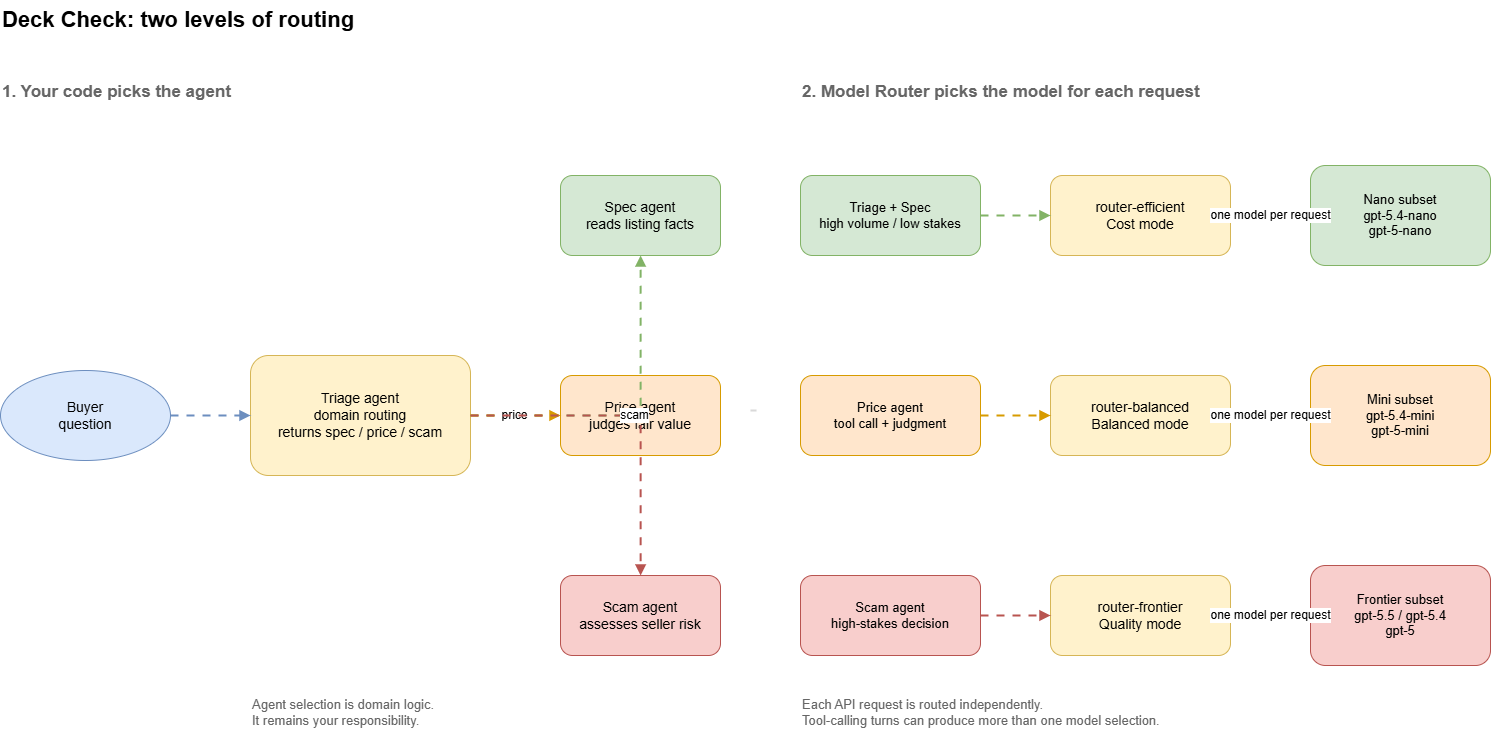
Model routing is ideal in multi-agent architectures, as different tasks fall into different complexity categories, so they would be better served being handled by models that are appropriate to the task they are given, rather than just burning tokens to use powerful models for simple tasks. The complexity of each request is assessed by the model router before models are invoked, and then the model router will decide which model matches the requirement of the request.
A friend of mine mentioned to me that he used Opus 4.8 to look up git commands. I don’t want to shame him, but that’s a simple web search….
Microsoft Foundry has a built-in Model router which is a trained ML model that analyzes each prompt in real-time and routes it to the most appropriate LLM for the task, optimizing for cost, quality of response, and latency. Model Router is an ML model that’s been trained on numerous scenarios ranging from single prompts to complex agentic workflows. Microsoft updates the active router version with new models and routing improvements, so you don’t have to.
For the remainder of this blog post, when we talk about the Model Router, that will refer to the Model Router capability in Microsoft Foundry. When we talk about model routing, that will apply to the concept. If you’re confused about anything, please ask me in the comments
How does it work?
Model Router will analyze prompts based on complexity, reasoning, the task type, and other attributes. When Model Router is used with agents, it analyzes the full request context. This includes the system message, user message, tool definitions, conversation history etc.
Model Router has three routing modes for us to choose from:
- Balanced considers models within a small quality band, then selects the most cost-effective.
- Cost, which uses a larger quality range and then chooses the most cost-effective model.
- Quality mode, which just picks the highest rated model for the prompt, and ignores the cost.
Each turn in the conversation is routed, as the Model Router works per-request, not per-session. During a conversation, you might have multiple agents using different models depending on the request. The router determines the complexity of the request based on the following:
- For factual recalls, simple greeting, or basic follow-up questions, these requests are considered low complexity tasks and will use cheaper models.
- Tool orchestration will route to mid-tier models to reliably generate structured tool calls at a lower cost.
- Research, multi-step reasoning, and complex code generation route are highly complex tasks, and therefore typically will be routed to higher-performing, higher-cost models.
Within Foundry, we can create multiple model router deployments, with their own routing modes and model subset. For example, we can create a deployment called router-efficient that uses the cost routing mode, which then the model router uses to route our prompts to cheaper models, such as gpt-5-nano.
Deploying a Model Router in Microsoft Foundry
Setting up Model Routers in Microsoft Foundry is similar to creating a regular deployment. You can find it in the Foundry model catalog just by typing model-router:
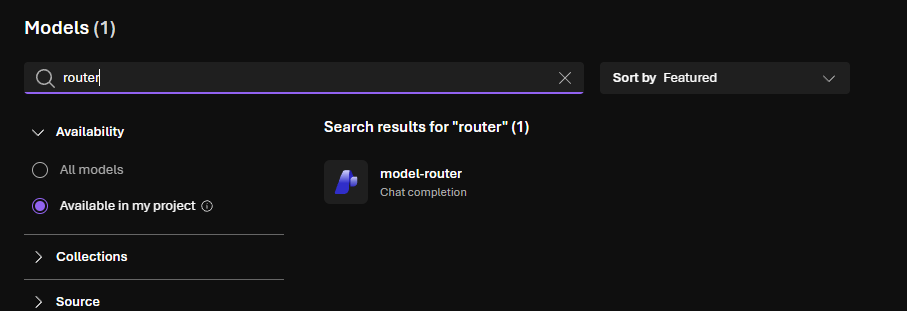
The defaults give us Balanced mode across the full supported model set. You can also customize it if you need different routing modes or you want to restrict the subset of models to route to.
At the time of writing, model router is limited to five regions (Australia East being one of them). You don’t need to deploy the underlying models first, except for any Claude models that you want to use.
In Bicep, you can create your Model Routers like so:
resource efficientRouter 'Microsoft.CognitiveServices/accounts/deployments@2025-10-01-preview' = {
  parent: account
  name: 'router-efficient'
  dependsOn: [
    project
  ]
  sku: {
    name: skuName
    capacity: routerCapacity
  }
  properties: {
    model: {
      format: 'OpenAI'
      name: 'model-router'
      version: routerVersion
    }
    routing: {
      mode: 'cost'
      models: [
        {
          format: 'OpenAI'
          name: 'gpt-5.4-nano'
          version: '2026-03-17'
        }
        {
          format: 'OpenAI'
          name: 'gpt-5-nano'
          version: '2025-08-07'
        }
      ]
    }
  }
}
Again, the model router model is just another deployment under the Microsoft Foundry account. The Foundry Project hosts the agents, with the dependsOn: [project] line preventing concurrent writes to the account.
For our sample, we’ll use a triage agent to route to different agents depending on the task. The Model router for each specialist agent then selects the underlying model. In the Bicep block above, we’ve implemented the Cost mode so that simple tasks get routed to agents using the gpt-5.4-nano or gpt-5-nano models. This is handy when we want to further refine which models handle tasks.
The downside here is that you’ll need to keep an eye on when certain models are deprecated.
Building our sample
Going back to skateboarding, imagine a multi-agentic system for a second-hand skateboard gear marketplace, where skaters can buy second-hand gear from others, instead of having to shell out hundreds of dollars to get a decent setup.
If you want to follow along with the code, check it out on my GitHub!
Listings on the marketplace might look like the following, where we hold product information, the condition of their gear, a photo, and information about who’s selling it:
{
"L01": {
    "brand": "Powell Peralta",
    "model": "Flight",
    "width_in": 8.25,
    "length_in": 32.0,
    "wheelbase_in": 14.25,
    "condition": "good",
    "price_aud": 140,
    "photo": "photo of the actual item",
    "seller_id": "S01",
    "posted_days_ago": 6,
    "description": "riding it about 8 months, few chips on the tail but no cracks. pickup Brunswick or can post"
  }
}
Within the marketplace, there are sellers. The information that we might have about sellers include how long their account has been open, how many sales they have completed, how many disputes they currently have open, a satisfaction rating, and whether or not they have a verified payment:
{
"S01": {
    "account_age_days": 1240,
    "completed_sales": 87,
    "open_disputes": 0,
    "rating": 4.9,
    "verified_payment": true
    }
}
To demonstrate model routing, we can implement the following agents:
| Agent | Job | Router | Mode |
|---|---|---|---|
triage |
Decide which specialist answers | router-efficient |
Cost |
spec |
Read a width off a listing | router-efficient |
Cost |
price |
Judge whether an asking price is fair | router-balanced |
Balanced |
scam |
Decide whether a listing is a scam | router-frontier |
Quality |
For simple queries or triaging questions, we use lower cost models for these simple tasks. For analysis or research type tasks (such as determining whether a listing is a scam or not), we route to a frontier model.
Configuring our agents
To map our model routers, I have a config.py file that maps each specialist role to a router deployment:
def deployment_for(self, role: Role) -> str:
        return {
            Role.SPEC: self.router_efficient,
            Role.PRICE: self.router_balanced,
            Role.SCAM: self.router_frontier,
        }[role]
Agents are then created with the router deployment name like so:
def ensure_agents(project: AIProjectClient, settings: Settings) -> dict[Role, str]:
    """One agent per job, each on the router deployment that suits it."""
    created: dict[Role, str] = {}
    for role, spec in AGENT_SPECS.items():
        agent = project.agents.create_version(
            agent_name=f"deck-check-{role.value}",
            definition=PromptAgentDefinition(
                model=settings.deployment_for(role),
                instructions=spec.instructions,
                tools=spec.tools or None,
            ),
        )
        created[role] = agent.name
    return created
This produces the following agents and assignments:
deck-check-spec  -> router-efficient -> Cost mode
deck-check-price -> router-balanced  -> Balanced mode
deck-check-scam  -> router-frontier  -> Quality mode
The triage agent also uses the efficient router, so we can configure it like this:
triage_agent = ensure_triage(
    project,
    settings.router_efficient,
)

def ensure_triage(
    project: AIProjectClient,
    deployment: str,
) -> str:
    agent = project.agents.create_version(
        agent_name="deck-check-triage",
        definition=PromptAgentDefinition(
            model=deployment,
            instructions=TRIAGE_INSTRUCTIONS,
        ),
    )
    return agent.name
Having the Model Router as just another deployment in Foundry is useful here, because in our application code, it’s just a model parameter.
If we didn’t have this, we’d have to implement our own classifier to perform the routing to different models, which would require more code.
To observe routing decisions, each response includes the model field which shows which model was selected by the Router. We can use this field to track routing distribution across our agent’s interactions:
def _record(response: Any, elapsed_ms: float) -> RequestRecord:
    usage = getattr(response, "usage", None)
    details = getattr(usage, "input_tokens_details", None)
    return RequestRecord(
        # The model field reveals which underlying model the router selected.
        model=getattr(response, "model", "unknown") or "unknown",
        input_tokens=getattr(usage, "input_tokens", 0) or 0,
        output_tokens=getattr(usage, "output_tokens", 0) or 0,
        cached_tokens=getattr(details, "cached_tokens", 0) or 0,
        latency_ms=elapsed_ms,
    )
Running our sample
Let’s buy a second hand board! Take a look at the following listing:
{
"L04": {
    "brand": "Santa Cruz",
    "model": "Screaming Hand",
    "width_in": 8.25,
    "length_in": 32.0,
    "wheelbase_in": 14.25,
    "condition": "good",
    "price_aud": 40,
    "photo": "stock catalogue image",
    "seller_id": "S90",
    "posted_days_ago": 1,
    "description": "BRAND NEW SEALED. price firm and i have 3 others. msg me on whatsapp and we can do bank transfer, dont bother with the app checkout its slow",
  }
}
The Santa Cruz Screaming Hand design looks pretty good, and if it’s just $40, that’s a good deal!
Almost too good right? Plus that description looks a little dodgy (always beware of sellers trying to install a sense of urgency in you. It could be a scam). Let’s ask our agents to check it out.
First let’s get some basic facts about the deck:
L04  Santa Cruz Screaming Hand, good, 40 AUD

you> what width is this deck?
    triage    gpt-5-nano-2025-08-07      -> spec     3.8 s
    spec      gpt-5.4-nano-2026-03-17       basic       1.9 s
    > The deck width is 8.25 in.
This is a simple question asking about a fact about the deck, so as we can see, the triage agent uses gpt-5-nano to route our question to the spec agent, who can answer the simple fact check for us using a cheaper model.
Now let’s see if the $40 price tag is a fair price for the board:
you> Is $40 fair for this?
    triage    gpt-5.4-nano-2026-03-17    -> price    2.9 s
    price     gpt-5-mini-2025-08-07         medium     68.1 s   tool: lookup_comparables
    > No — $40 is far below market for a Santa Cruz Screaming Hand. Comps for "good" condition show a median ~AUD105 (IQR ~92–120), so a realistic price is around AUD100–120 (higher if truly brand-new sealed). Also note red flags in the listing (stock photo, contradictory condition text, and request to deal off-platform) — treat $40 as suspicious and verify before paying.
    > Estimated fair value: 100 AUD
Oh, ok. We can see that the triage agent has routed our question to the price agent, which has used our balanced routing mode to produce an answer for us. It’s also highlighted a couple of issues that it sees with the listing, mentioning contradictory information about the condition, and request to complete the transaction off-platform.
Let’s see what our scam detector agent thinks of this! For this, we’ll need to route our task to an agent who uses a frontier-level model, which is what our scam detector does.
you> Is this seller dodgy?
    triage    gpt-5-nano-2025-08-07      -> scam     3.8 s
    scam      gpt-5.5-2026-04-24            frontier    4.8 s   tool: lookup_seller_history
    > Yes — this looks very dodgy. The listing uses a stock catalogue image, the account is only 3 days old with 0 completed sales and no verified payment, the price is very low at 40 AUD for a “brand new sealed” Santa Cruz deck, and the seller is pushing WhatsApp plus bank transfer instead of app checkout.
    > Verdict: likely scam — avoid and do not pay off-platform.
Our scam agent, which uses a frontier level model, has identified that this seller looks very dodgy, and listed the reasons why it’s come to that verdict.
So the triage agent has selected the scam detector agent, whose Model Router has selected the gpt-5.5 model to detect the scam, helping us avoid an obvious scam.
N.B I had too much fun with this example as you could probably tell…
Conclusion
Hopefully you now have a better understanding of how model routing works in Microsoft Foundry. You just deploy it like any other model deployment, configure your agents to use the model router, and the model router will select a model according to the configured mode and model subset.
Let this be your sign to ease up on the token spending when building your agents, and let easier tasks be handled by lower cost models. Models like Opus and Fable are powerful (and a lot of fun), but use their power in the proper place.
One thing I didn’t cover too deeply here is how evaluations work for Model Routing. That’s probably another blog post for itself, but I’d recommend checking out the Model Router Auto Evaluation toolkit made by the Foundry team.
If you haven’t already, check out the sample on my GitHub.
If you have any questions about this, please feel free to reach out to me on BlueSky!
Until next time, Happy coding! 🤓🖥️