I run various Container Apps as part of my personal health project. I want this project to be as low maintenance as possible, so I decided to take a look at Azure SRE Agent to see how it could help me reduce the operational toil required to operate my side project.
As I’m writing this blog post (8th January 2026), Azure SRE Agent is still in Preview. There’s no mechanism to provision SRE Agents using Bicep, or any IaC for that matter, and I’m expecting to see things break or not quite work as nicely as they should, so consider everything that I’m writing here experimental, and expect that features will change as time goes by.
What is Azure SRE Agent?
Azure SRE Agent is a service that automates Site Reliability Engineering practices and adds a little intelligence to it through AI capabilities. The idea is that it helps reduce the manual toil needed to diagnose issues, which should help to improve system uptime.
SRE Agent can integrate with systems in Azure and external systems and can execute operational tasks with minimal human intervention.
SRE Agent can manage Azure services through the Azure CLI and REST APIs. Through this capability, I’m hoping that SRE Agent can help me manage my Container Apps (my compute workloads), Cosmos DB (my database), and Log Analytics (monitoring).
There are two primary use cases for using Azure SRE Agent:
- Automating incidents
By connecting to your incident management platforms, SRE Agent can automate the triaging, mitigation, and resolution of incidents. The idea here is to reduce the mean time of recovery (MTTR) and improve service availability.
N.B MTTR is the time taken to restore a component after a failure is detected. For me details, check the docs.
- Automating scheduled workflows
With SRE Agent, you can set up proactive alerting and actions to automate routine and repetitive tasks that run on a schedule.
How do Azure SRE Agents work?
SRE Agents are preconfigured with understanding of Azure services and can execute Azure CLI commands and REST API calls for any Azure service. You can also build specialized agents for specific services like virtual machines, databases, or networking components.
You can also connect to external services, such as external monitoring and observability systems, incident management systems, source control, data sources, and MCP servers.
Creating our SRE Agent
To create our agent, we need to grant it the correct permissions, configure the settings, and grant the agent access to the right resources.
If you’re creating the agent, you need to ensure that your user account has the Microsoft.Authorization/roleAssignments/write permissions in either the Role Based Access Control Administrator or User Access Administrator. You may also need to add *.azuresre.ai to the allowlist in your firewall settings.
Once you have all of that, we can create our agent. Like I said earlier, we currently can’t create an agent using Bicep (I don’t know when we will either). We must do it through the portal.
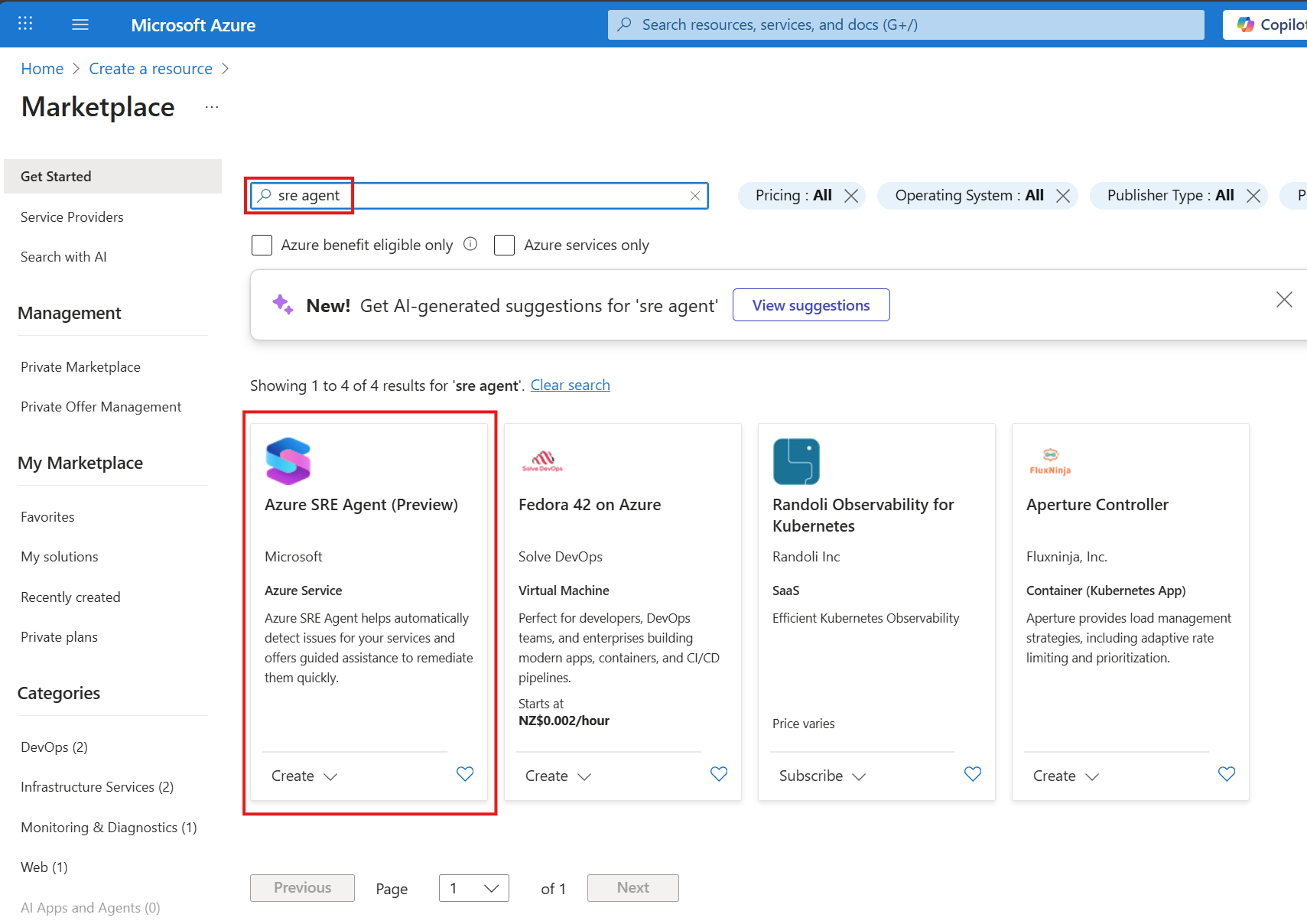
In the portal, click on Create to navigate to the marketplace. You can either type sre agent in the search textbox, or click on Azure SRE Agent (Preview) to start the process:
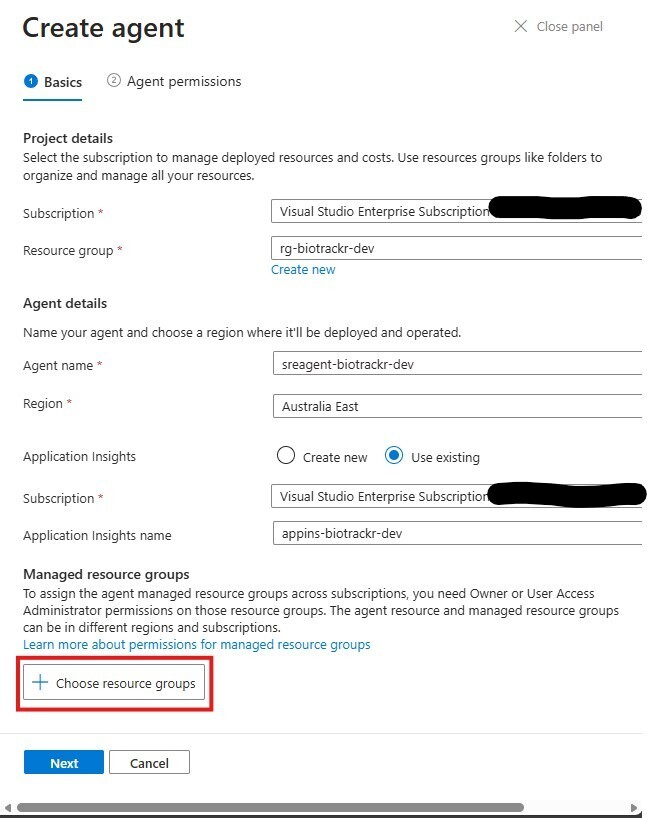
For the basics section, you can choose which subscription and resource group you want to deploy the SRE Agent to.
Give your agent a name and pick a region to deploy it to. At the time of writing, you can only deploy agents to Australia East (lucky for me!), East US 2, and Sweden Central.
As part of deploying an SRE agent, there are supporting resources that get deployed alongside the agent:
- Managed Identity
- Application Insights workspace
- Role Assignments.
Here, I am selecting an existing App Insights workspace to connect my SRE Agent to. You can create a new workspace if you want to.
A new managed identity resource is created as it’s tied to the agent. This managed identity can either have the Reader or Privileged access to resources that it’s monitoring.
Next, we choose a resource group for the SRE Agent to manage. For my application, I deploy all my resources to a one resource group, which makes life a little easier. If/When agents will be able to manage resources across different topologies (such as management groups or subscriptions), I don’t know.
Click on choose resource groups.
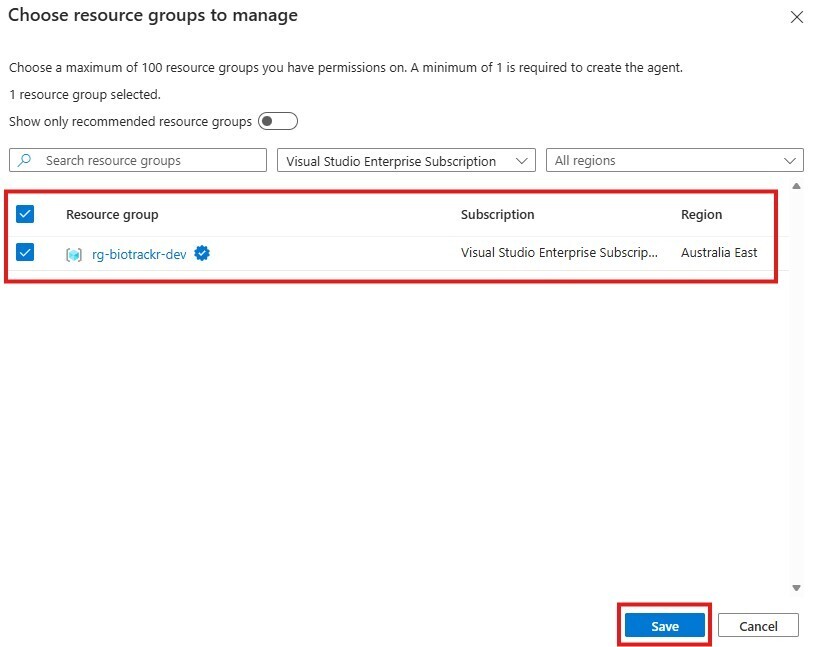
Here you’ll pick a resource group for the SRE Agent to have permissions on. You need at least 1 resource group to create the agent, and you can choose up to 100 resource groups.
That seems cumbersome, so hopefully SRE Agents can have permissions over subscriptions and management groups to make this a little more manageable.
One neat thing is that a check mark appears next to the resource group name for resource groups that contain services that have specialized support.
Click on Save and then click Next.
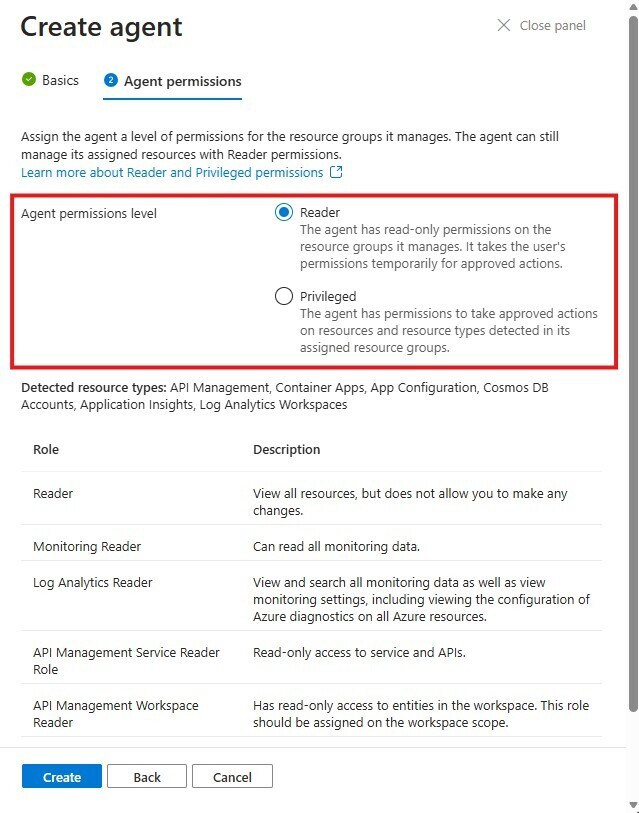
Now we need to configure the permissions that the Agent has over the resource group that it manages.
There are two permission levels for SRE Agents:
- Reader - This gives the agent read-only permissions on the resource groups that it manages. To take actions, the agent will take the user’s permissions temporarily for approved actions.
- Privileged - This gives the agents permissions to take approved actions on resources and resource types detected in the resource groups that you assign to the SRE Agent.
These permissions are tied to the managed identity that’s created as part of the SRE Agent deployment. For my agent, I’ve configured the agent with the Reader permission. That means when a necessary action the agent needs to take requires an elevated permission, the agent should prompt me for a temporary elevation in permissions using the on-behalf-of (OBO) flow to complete the required action.
During the creation of the agent, the type of resources within the managed resource group will be detected, and the required permissions will be assigned to the agent.
We can change these permissions at any time by modifying the IAM settings of a resource group that the agent manages. As you add and remove resource groups that the agent manages, permissions should be updated accordingly.
For more information on how managed identity permissions work in Azure SRE Agent, check out the docs
Click on Create to create your agent, and observe what gets created as part of the deployment. You should see the SRE Agent, managed identity, role assignments, and App Insights workspace (if you chose to create a new one) all being created.

Using our SRE Agent for discovery
Once our agent has been created, we can start asking it questions about our resources and getting it to solve incidents that happen in our resources.
Let’s start simple by getting it to answer some discovery questions about resources in our resource group that the agent can manage. On Azure Docs, there are a list of sample prompts that you can use to work with the agent, including specific prompts that work for Azure Container Apps.
First up, let’s see if it can list all my container apps by asking the agent the following question:
List all my container apps
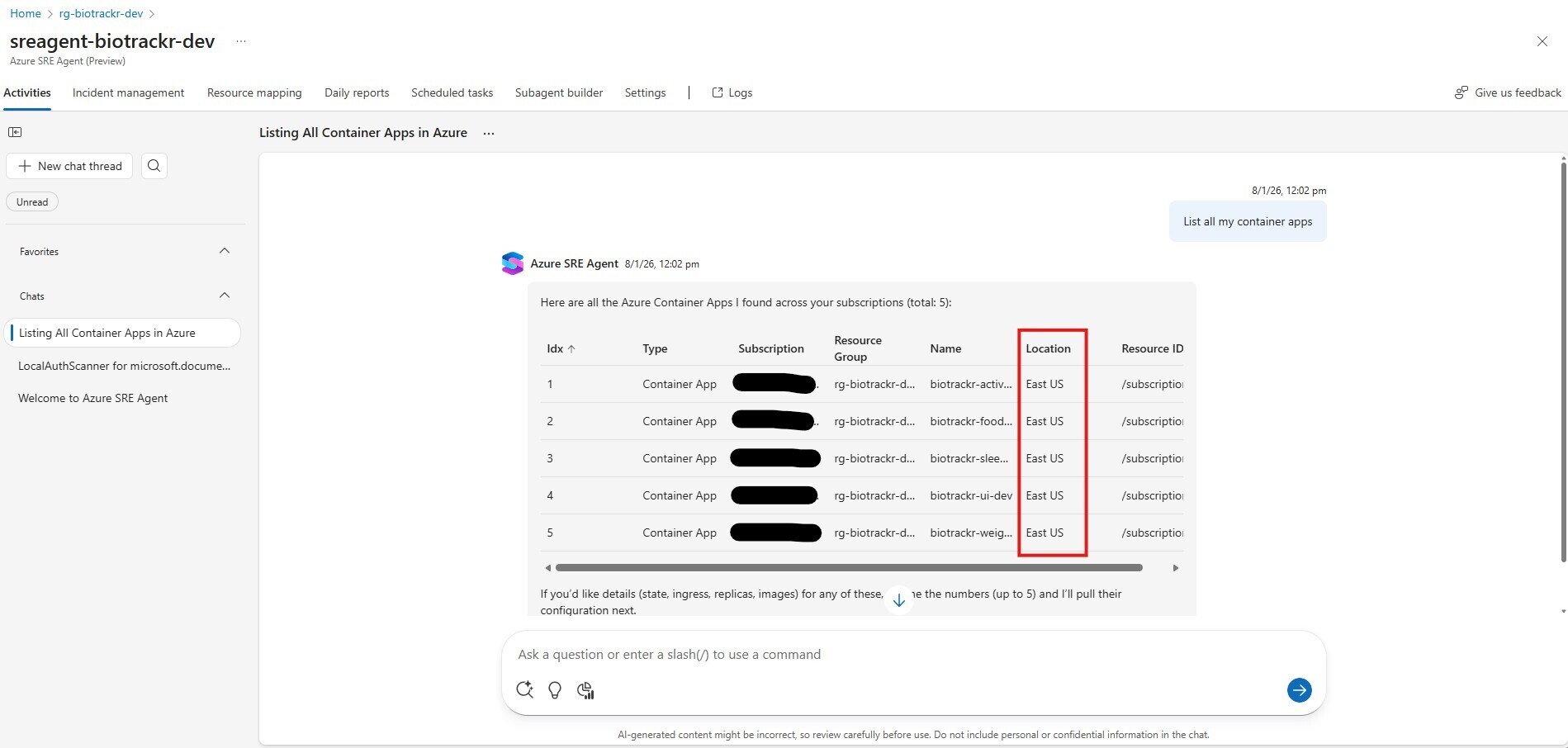
Wait a minute? What?! That’s not right 🤔 I have deployed all my resources to Australia East, not East US. Let’s refine our prompt to see if the response improves.
List all my container apps in the rg-biotrackr-dev resource group
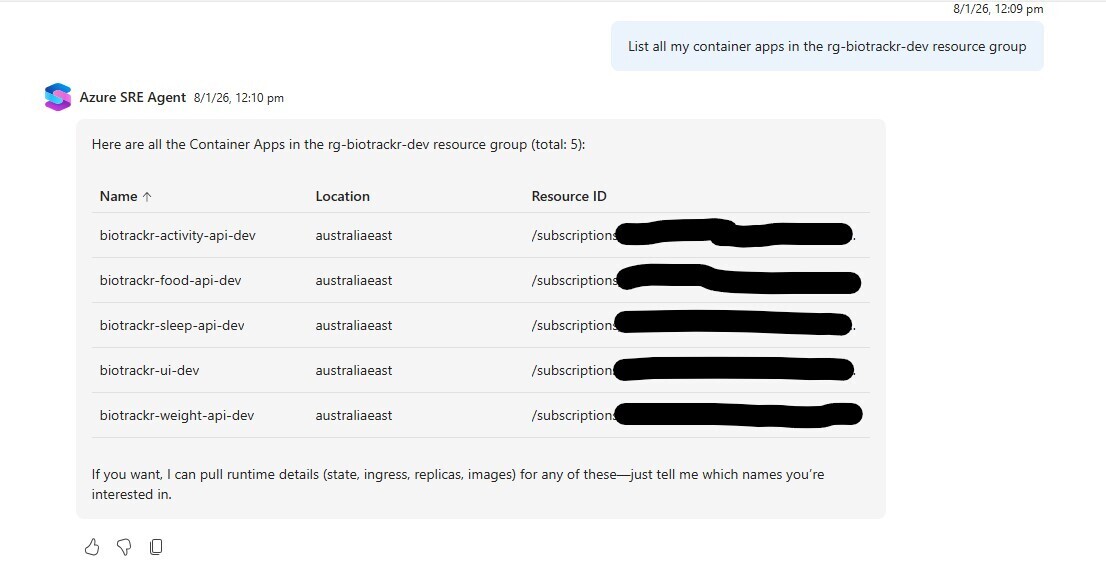
Alright, that’s a bit better. It’s only picking up my Container Apps (I also have jobs, which are a separate resource) and it’s showing that they are all deployed to Australia East.
Let’s try another query:
What container images are used in each of my container apps and container app jobs?
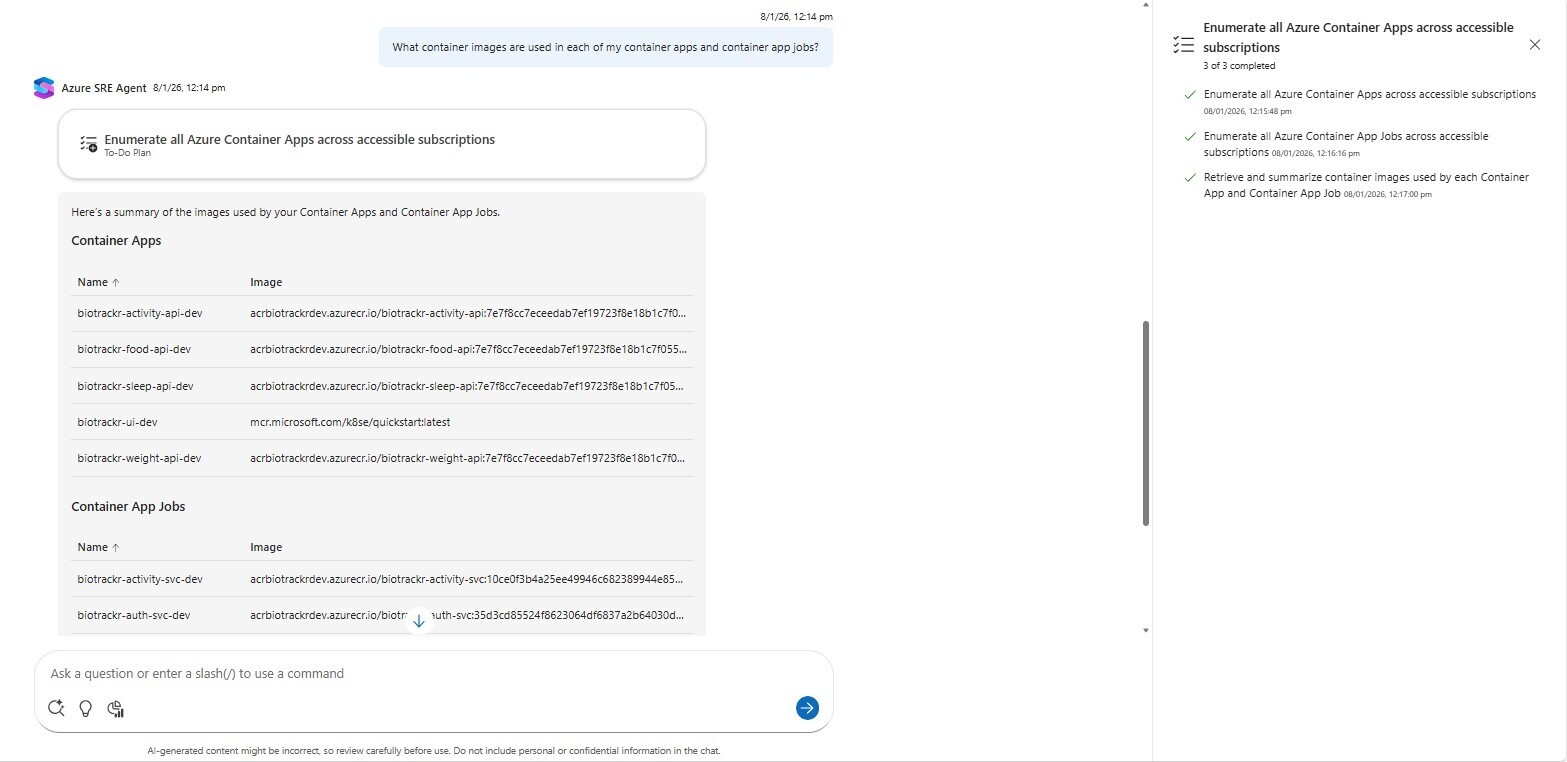
Looks like I got the correct response. My image tagging strategy uses the git commit hash as the tag, so I can attribute the image name to a specific commit, and the agent has successfully listed all the images for both my container apps and container app jobs.
I’ve also clicked on the To-Do Plan to see how the agent came up with its response. From the plan we can see that:
- The agent enumerated all Container Apps across accessible subscriptions.
- The agent then enumerated all Container App jobs across accessible subscriptions.
- It finally retrieved and summarized container images used by each Container App and Container App job.
So, asking questions, we’ve received some mixed results in accurate responses from our SRE Agent.
On the positive side, the Agent would be useful for new team members exploring their Azure resources for the first time, or for team members to see the status of their Azure resources. This is certainly better than having to trawl through resource groups and graph maps to see how everything fits together.
But as we’ve seen, it can produce factual errors, which is concerning. Examining the To-Do plan would shed light on why the Agent made factual errors, but since Agents have permissions over resource groups, it shouldn’t have been that hard to find out the details for all the container apps to produce an accurate response.
Using our SRE Agent for troubleshooting
Let’s purposely break one of my Container Apps to see how the SRE Agent handles troubleshooting! I’ll use one of the APIs as these errors are fairly low risk for now 😅 To do this, I’ll create a new revision with an invalid image like so:
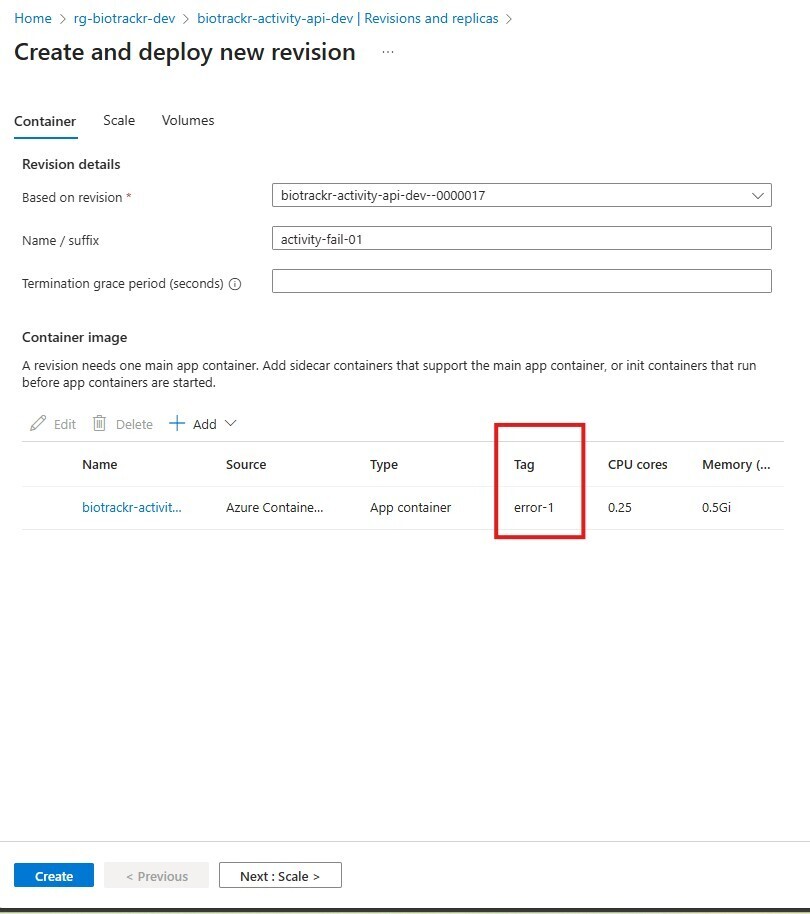
This should change the state of the container app to not running, so let’s attempt to use our SRE Agent to fix our container app.
In the chat box, let’s try the following prompt:
What's wrong with biotrackr-activity-api-dev?
The agent produced the following response:
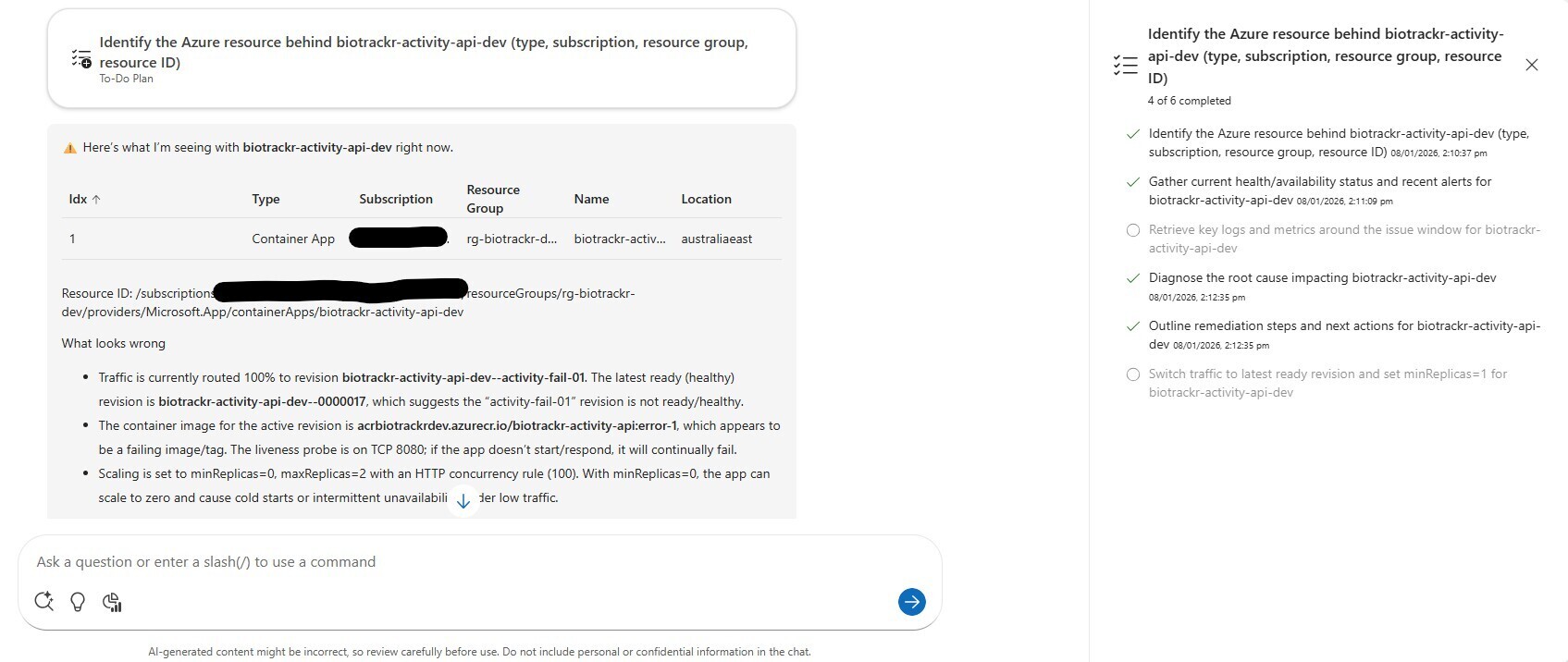
The Azure SRE Agent has identified that the biotrackr-activity-api-dev--activity-fail-01 revision has failed due to the incorrect image being specified for it, and it’s also claiming that since our replicas are set to 0, this can cause cold starts or intermittent unavailability under low traffic.
For my application’s purpose, we want to scale to 0 for cost reasons, but the agent has suggested that it can switch traffic to the latest ready revision and set minReplicas to 1 to stabilize the API. Sometimes Agents will respond with a yes-or-no question that you can use to provide approval to suggested actions.
In other cases, you can just provide a prompt, which we will do:
Roll back to the last working revision, but keep the number of replicas to 0
Failed to run the correct Azure CLI command 🥲
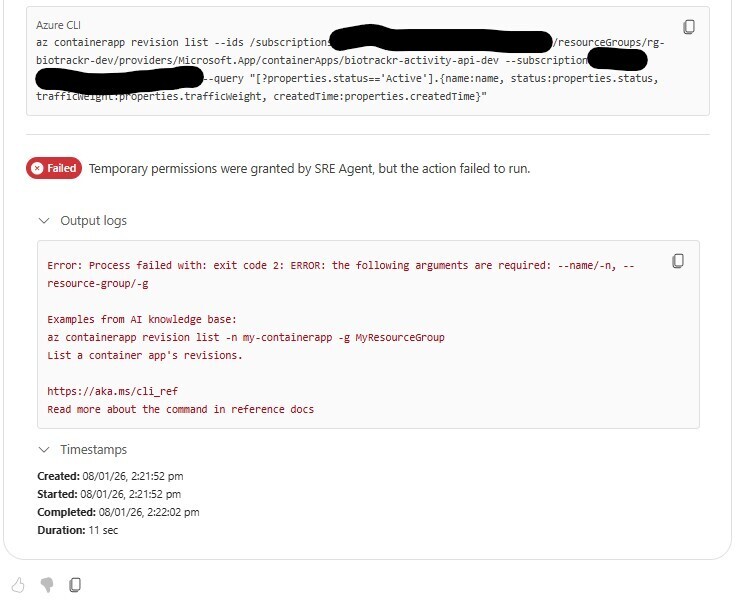
Let’s try being a little more specific:
Roll back biotrackr-activity-api-dev to the last working revision, but keep the number of replicas to 0
This is where I ran into more issues. Latency was a killer 😅 whether that’s a front-end issue or not I’m not sure. It also tried to rerun the same Azure CLI command that failed earlier.
Eventually I had to start a new chat window and enter the prompt again, but that didn’t exactly help things.
First, the SRE Agent tried to identify the last working revision and activate it. To do this, it tried to set the revision mode to Single mode:
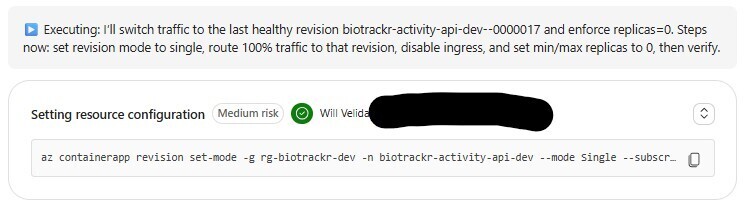
So, when it tried to set the traffic to that replica to 100%, the following error occurred:
Process failed with: exit code 1: ERROR: Containerapp 'biotrackr-activity-api-dev' is configured for single revision. Set revision mode to multiple in order to set ingress traffic. Try `az containerapp revision set-mode -h` for more details.
So, it switched the revision mode back to Multiple, which it was able to do, and then it set the traffic back to 100%. Success, right?
WRONG - It then attempted to disable ingress? When I asked it to revert that change, it then attempted to use the Azure CLI to set the max replica count to 0, which results in the following error:
Process failed with: exit code 1: WARNING: The behaviour of this command has been altered by the following extension: containerapp
ERROR: --max-replicas must be in the range [1,1000]
Once it recognised that (we’ll still suffering latency issues here), it ran the command with just the --min-replicas parameter specified. However, it applied this to our failing revision, instead of our last working revision.
It was adamant to keep the ingress disabled, which isn’t ideal for a public facing API 😅 After an hour of struggling with the agent’s hallucinations, I just went back into the Container App and fixed the problem myself.
Assessing Azure SRE Agent
It’s important to bear in mind that Azure SRE Agent is still in Preview. Things are not going to work as expected, and things will go wrong. That being said, there’s pros and cons that Azure SRE Agent offers.
It’s fairly easy to configure and get started with the SRE Agent. If you put yourself in the shoes of a new member to the team, and you need to get familiar with your new team’s Azure landscape, Azure SRE Agent can help cut the time it takes for you to onboard into your new environment. I think this will be especially useful for those of you in organizations that use naming conventions that aren’t descriptive.
The integrations look promising. In the future, I’ll connect the SRE Agent to my GitHub repository and look at integrations with Azure Monitor to see how they work together. If I have one central location where I can identify issues, raise them in GitHub, and then get the Agent to solve them, that will be beneficial for me.
However, beyond using Azure SRE Agent as a ChatGPT like interface for getting familiar with your environment, there’s still a lot of missing gaps. The latency suffered while trying to troubleshoot my container app was significant. There’s no point just waiting for an agent to do something in an hour that I know I can fix within 5 minutes. That’s a problem that needs to be solved.
How SRE Agent scopes specific Azure CLI commands was also a pain. It took numerous iterations to get to the right command, and the agent couldn’t interpret some prompts correctly, which would cause even more problems if you weren’t careful. Again, kind defeats the point if you’re sitting at your desk looking at an agent fail with an issue that you know you can solve in 5 minutes.
Conclusion
It’s very early stages. The idea of an SRE Agent is promising, but at this stage of development, there’s still a few gaps in SRE Agent that I’d like to see addressed.
Being able to provision agents with IaC us a must. It’d also be great to choose which model the SRE Agent uses.
If you’re on that product team and want to collaborate with me on solving those issues, please ping me on Teams! I’m here to help where I can 🙂
I’d encourage everyone to have a play around with Azure SRE Agent and see how you find it. If you have had more success than me, let me know!
If you have any questions about Azure SRE Agent, please feel free to reach out to me on BlueSky or comment below.
Until next time, Happy coding! 🤓🖥️