My side project (Biotrackr) started as a Fitbit data tracker and has gradually evolved into a full multi-agent system. Currently, it tracks my health data from Fitbit including sleep patterns, activity levels, food intake, and weight. I’ve recently built a chat agent that allows me to ask questions about my health data through the UI. However, I wanted to take this a step further and use another agent to build charts and graphs to visualize my data.
The core problem: my chat agent handles health data questions well, but generating PDF reports with charts and trend visualizations requires code execution — writing Python scripts, running them in a sandbox, collecting the output artifacts. That’s a fundamentally different AI task from conversational Q&A.
Rather than building one monolithic agent that does everything poorly, I split the work across specialized agents. The conversational agent uses the Microsoft Agent Framework (MAF) with Claude. The report generation agent uses the GitHub Copilot SDK with a sandboxed Python sidecar. I’m also using Entra Agent ID, which authenticates the handoff between the agents with no shared secrets, just cryptographic tokens with audit trails and a kill switch.
MAF recently reached version 1.0 with stable APIs and long-term support, while the Copilot SDK and Entra Agent Identity are still in preview. The platforms are evolving and maturing, however there were a couple of tactical decisions I had to make to get this all to work together.
Architecture Overview
Here’s how the components connect:
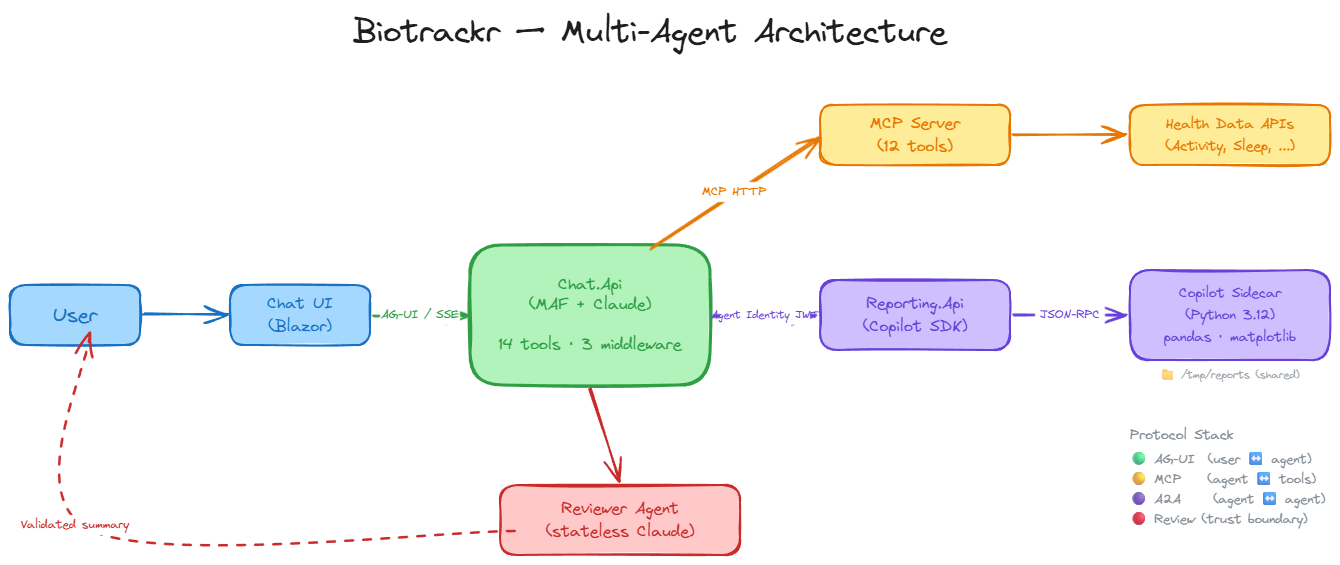
- Chat.Api orchestrates conversations, calls tools, and streams responses via AG-UI.
- MCP Server exposes 12 read-only health data tools across activity, sleep, weight, and food.
- Reporting.Api generates Python-based reports inside a sandboxed container.
- The Reviewer Agent validates every report before it reaches the user.
Together, these represent all three layers of the emerging agentic protocol stack: AG-UI for frontend streaming, MCP for tool access, and agent-to-agent communication for the backend handoff. Each protocol layer handles a different boundary — user-to-agent, agent-to-tool, and agent-to-agent — and each uses the right transport for the job.
Why two different agent frameworks? The short answer: each excels at a fundamentally different task, and trying to force one framework to do both would mean compromising on the strengths of each:
| Requirement | MAF (Chat) | Copilot SDK (Report) |
|---|---|---|
| Conversational streaming | AG-UI SSE transport | Not designed for streaming chat |
| Code generation + execution | No built-in sandbox | Sandboxed CLI with file I/O |
| Tool ecosystem | MCP tools + native functions | Built-in shell/read/write |
The Chat Agent: Microsoft Agent Framework
The Microsoft Agent Framework (MAF) is the successor to Semantic Kernel and AutoGen, unifying both under a single .NET agent framework. If you’ve used either, the concepts will be familiar, but MAF provides a cleaner abstraction layer.
The core type is ChatClientAgent, which wraps any IChatClient implementation. In Biotrackr’s case, that’s Anthropic’s Claude, but it could be any LLM provider with an IChatClient adapter. MAF’s middleware pipeline mirrors ASP.NET Core’s request pipeline, intercepting agent runs for cross-cutting concerns like conversation persistence, rate limiting, and error handling. The AG-UI transport provides SSE-based streaming to the frontend with a single MapAGUI() call.
The first pattern worth understanding is the dynamic agent. MAF agents are immutable after construction, meaning that you can’t add or remove tools from a built agent. But what happens when the MCP Server isn’t available at startup? The agent starts with zero tools. When MCP comes online, the agent needs rebuilding. The solution is a stable outer agent that delegates to a per-request inner agent:
AIAgent dynamicAgent = initialAgent
    .AsBuilder()
    .Use(runFunc: null, runStreamingFunc: (messages, session, options, innerNext, cancellationToken) =>
    {
        return agentProvider.RunStreamingWithLatestAgentAsync(messages, session, options, cancellationToken);
    })
    .Build();

app.MapAGUI("/", dynamicAgent);
The outer agent holds the stable AG-UI mapping. The inner delegate re-resolves the latest agent per request via ChatAgentProvider. This enables self-healing, the agent starts degraded and automatically picks up tools when the MCP Server comes online.
The middleware pipeline handles cross-cutting concerns without cluttering the agent logic:
return chatAgent
    .AsBuilder()
        .Use(runFunc: null, runStreamingFunc: toolPolicyMiddleware.HandleAsync)
        .Use(runFunc: null, runStreamingFunc: persistenceMiddleware.HandleAsync)
        .Use(runFunc: null, runStreamingFunc: degradationMiddleware.HandleAsync)
    .Build();
Three layers: tool budget enforcement (max 20 calls per session to prevent runaway tool loops, an ASI02 mitigation against tool misuse), conversation persistence to Cosmos DB (last 50 messages hydrated for context, capped at 100 messages and 10K characters per conversation to limit context poisoning — ASI06), and graceful degradation that catches Claude API errors (503s, 429s, timeouts) and returns user-friendly messages instead of stack traces. Each middleware is non-fatal, so if persistence fails, the user still gets their response.
Finally, Claude batches parallel tool calls, but MAF defaults to sequential execution. One line fixes that:
var functionInvoker = chatAgent.ChatClient.GetService<FunctionInvokingChatClient>();
if (functionInvoker is not null)
{
    functionInvoker.AllowConcurrentInvocation = true;
}
The agent has access to 12 MCP tools for health data queries plus 2 native function tools (GenerateReport and CheckReportStatus) — 14 total tools for the conversational agent to work with.
MCP Server: The Tool Layer
The MCP Server exposes all health data as tools with a remarkably simple setup:
builder.Services.AddMcpServer()
    .WithHttpTransport(o => o.Stateless = true)
    .WithToolsFromAssembly();
Three lines. Assembly scanning auto-discovers 12 tool classes across 4 health domains (activity, sleep, weight, food), each with 3 query patterns (ByDate, ByDateRange, GetAllRecords).
On the Chat.Api side, McpToolService runs as a singleton IHostedService with a 30-second reconnection timer for self-healing.
If you’re new to building MCP servers in .NET, I covered the fundamentals in Building a Sports-Themed MCP Server Using .NET and Building Remote MCP Servers with .NET and Azure Container Apps.
If the MCP Server goes down, the service automatically attempts to re-establish the connection and rebuild the tool set. When tools are discovered, they’re wrapped with CachingMcpToolWrapper using DelegatingAIFunction to preserve MCP tool metadata (name, description, JSON schema).
The caching strategy reflects the data lifecycle: today’s data (still syncing from Fitbit) gets a 5-minute TTL, while historical data (immutable once synced) gets a 1-hour TTL. Date range queries get 30 minutes, and paginated record queries get 15 minutes. This cuts redundant API calls significantly during multi-turn conversations where the agent repeatedly references the same data.
The Report Generator: GitHub Copilot SDK
The GitHub Copilot SDK provides programmatic control of the Copilot CLI as a sidecar process. Unlike MAF, which is designed for conversational agents, the Copilot SDK is designed for programmatic code generation in controlled environments. Communication happens via JSON-RPC on localhost, and the session-based model (CopilotClient → CopilotSession) requires a permission handler for every interaction — you can’t create a session without telling the SDK what the agent is allowed to do. The sidecar handles LLM inference, tool execution (file I/O, shell commands), and code generation. It’s currently in Public Preview (v0.2.1-preview.1).
The sidecar architecture is the sandbox. A Python 3.12-slim container runs copilot --headless --port 4321 with a pre-installed data science stack: pandas, matplotlib, seaborn, reportlab, and numpy. A shared /tmp/reports volume exchanges artifacts between the API and sidecar. The container runs as a non-root user with no managed identity credentials and no network routes to downstream services. The container IS the sandbox.
Every session requires a permission handler — this is deny-by-default at the SDK level:
private Task<PermissionRequestResult> HandlePermissionRequest(
    PermissionRequest request, PermissionInvocation invocation)
{
    logger.LogInformation("Permission request: Kind={Kind}", request.Kind);

    if (!AllowedPermissionKinds.Contains(request.Kind))
    {
        logger.LogWarning("Denied permission request Kind={Kind}", request.Kind);
        return Task.FromResult(new PermissionRequestResult
            { Kind = PermissionRequestResultKind.DeniedByRules });
    }

    return Task.FromResult(new PermissionRequestResult
        { Kind = PermissionRequestResultKind.Approved });
}
Only shell, read, and write are allowed. Everything else (network access, environment variables, process control) is denied. This is a direct mitigation for ASI02 — Tool Misuse and Exploitation.
After the sidecar generates Python scripts, a code validation gate scans for dangerous patterns before artifacts reach blob storage:
private static readonly string[] DangerousCodePatterns =
[
    "os.system", "subprocess", "socket.", "urllib",
    "requests.", "__import__", "eval(", "exec(",
    "shutil.rmtree", "os.remove", "open('/etc",
    "open(\"/etc", "curl ", "wget ", "nc ",
    "bash ", "sh -c", "os.popen"
];
Eighteen patterns covering shell injection, network access, arbitrary code execution, and filesystem destruction. This is a post-execution defense against ASI05 — Unexpected Code Execution. The container’s network isolation is the primary sandbox, and this gate is the safety net.
The async job pattern ties it together: POST /api/reports/generate returns 202 Accepted with a jobId. A background Task.Run() drives generation with a 15-minute timeout and max 3 attempts. GET /api/reports/{jobId} polls for completion and returns SAS-linked artifact URLs with 24-hour expiry. The tactical reality: fire-and-forget Task.Run means jobs are lost on pod restart — acceptable for single-instance Container Apps deployments.
Several resilience controls protect the pipeline:
| Control | Purpose | OWASP ASI |
|---|---|---|
Kill switch (ReportGenerationEnabled) |
Immediately disables all generation via config | ASI10 |
| Concurrency limiter (SemaphoreSlim, max 3) | Prevents resource exhaustion from parallel jobs | ASI08 |
| Sidecar health check | Verifies Copilot CLI is reachable before accepting a job | ASI08 |
| Artifact size validation (50 MB max) | Flags anomalously large generated files | ASI10 |
| Prompt injection detection | Scans task messages for common injection patterns | ASI01 |
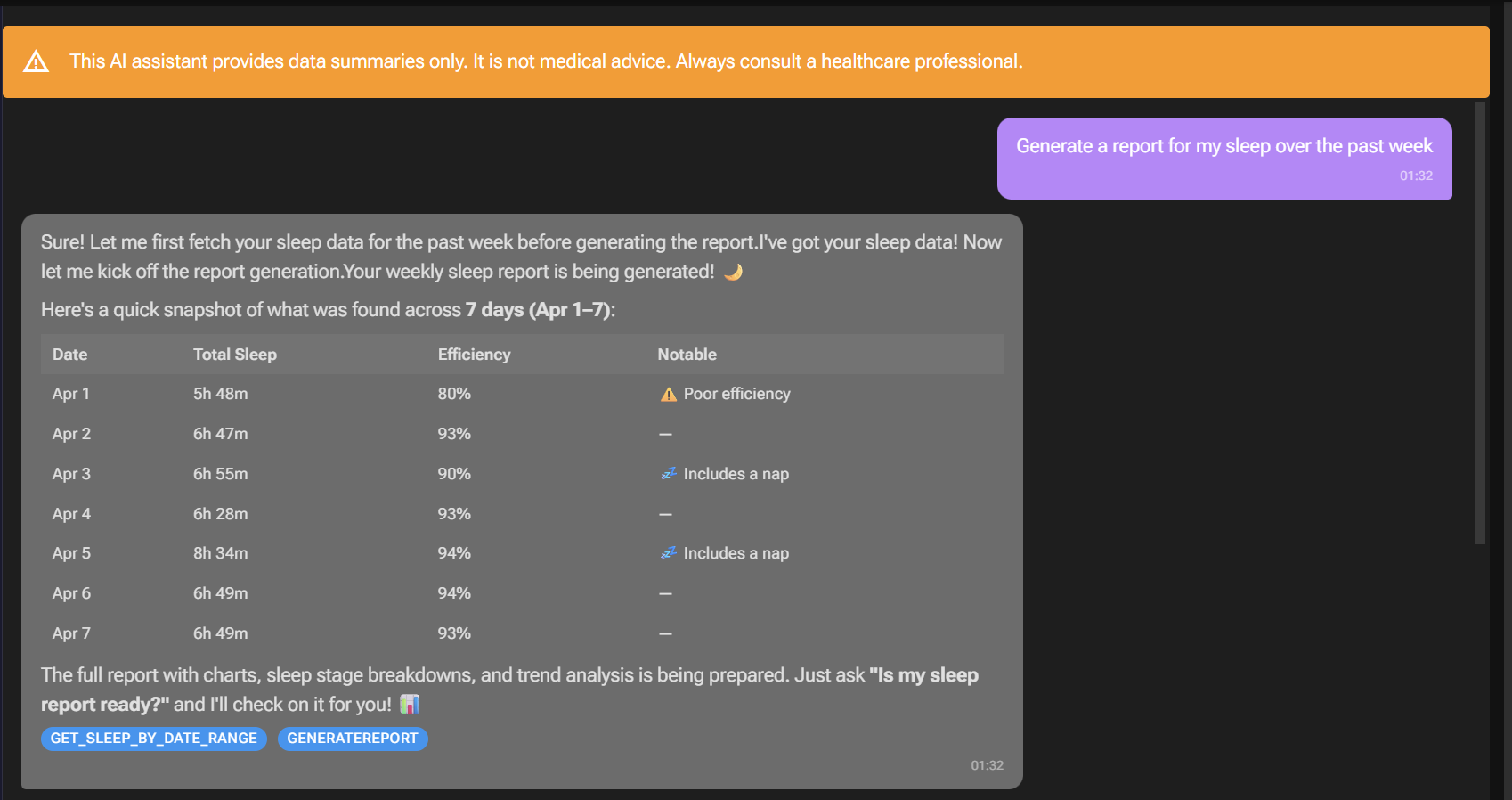
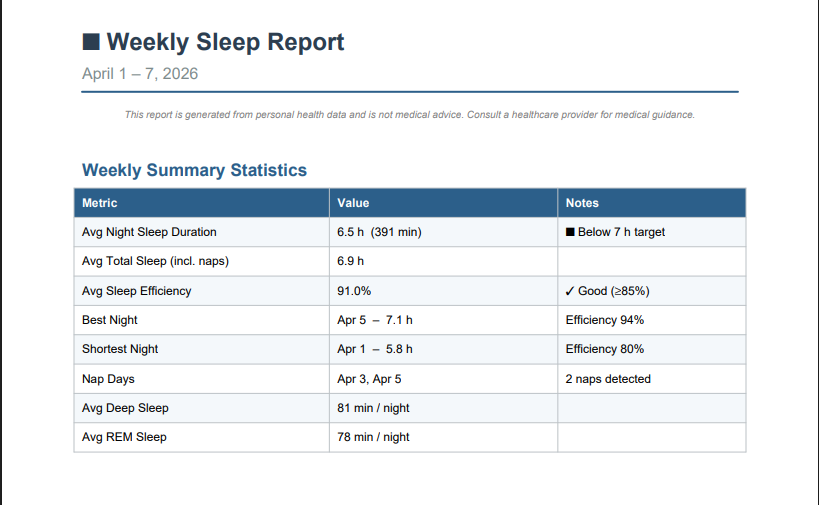
Once the report is ready, users can request the report and download it from Azure Blob Storage:
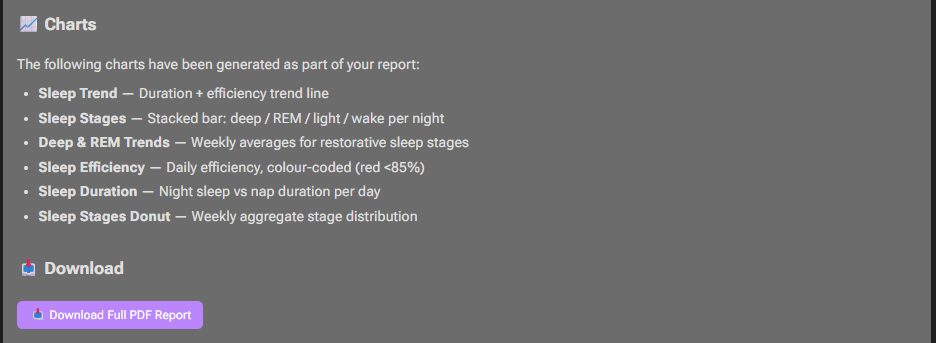
The generated report uses matplotlib and pandas to generate charts, graphs, and tables within the report:
Agent Identity: Entra Agent ID and Inter-Agent Authentication
When one agent calls another, the receiving agent needs to answer a fundamental question: who is calling me, and should I trust them?
Managed identities and service principals work for traditional service-to-service auth, but they don’t distinguish between “the deployment pipeline” and “the AI agent.” Entra Agent ID solves this. It’s a purpose-built identity type for AI agents, separate from managed identities and service principals.
The model works in two layers: a blueprint defines the agent’s identity configuration, and individual agent identities are instances of that blueprint. Tokens carry an xms_act_fct: 11 claim that identifies the caller as an AI agent in Entra sign-in logs — a separate category from “application.” Federated Identity Credentials (FIC) bridge a managed identity to an agent identity without secrets, and the blueprint acts as a kill switch: disable it, and ALL agent identity tokens are revoked instantly.
Here’s how Chat.Api acquires an agent identity token:
_credential.Options.WithAgentIdentity(_settings.AgentIdentityId);
_credential.Options.RequestAppToken = true;

var tokenRequestContext = new TokenRequestContext([_settings.ReportingApiScope]);
var accessToken = await _credential.GetTokenAsync(tokenRequestContext, cancellationToken);
The flow: the Container App’s user-assigned managed identity provides the initial FIC assertion, authenticates as the agent identity blueprint, and acquires an agent identity token scoped to the Reporting.Api (api://{BlueprintAppId}/.default). An AgentIdentityTokenHandler (a DelegatingHandler) auto-attaches this as a Bearer header on all outbound Reporting.Api requests.
On the receiving side, Reporting.Api validates the caller with a single authorization policy:
builder.Services.AddAuthorizationBuilder()
    .AddPolicy("ChatApiAgent", policy =>
    {
        policy.RequireAuthenticatedUser();
        policy.RequireClaim("azp", chatApiAgentIdentityId);
    });
The azp (authorized party) claim is the key. It identifies WHICH agent is calling. Every endpoint except the health check requires this policy. This addresses both ASI03 — Identity and Privilege Abuse and ASI07 — Insecure Inter-Agent Communication, the token proves the caller is a specific agent, not just any authenticated service.
A few tactical decisions worth noting: Cosmos DB also authenticates via agent identity (same WithAgentIdentity pattern, no connection strings). Chat.Api and Reporting.Api share the same Azure App Configuration store, but both need different AzureAd:ClientId values. Reporting.Api uses container environment variables for AzureAd settings to avoid key collisions. Chat.Api calls Reporting.Api directly, bypassing APIM intentionally — strong app-level auth makes the gateway redundant for internal agent-to-agent traffic, and removing it avoids the latency.
The Reviewer Agent: Trust But Verify
When a report is marked “generated,” the Chat.Api’s CheckReportStatus tool doesn’t just hand it to the user. It invokes a separate reviewer agent — a stateless Claude call using the raw Anthropic SDK (not MAF). The reviewer has no tools and cannot modify data. It exists to validate.
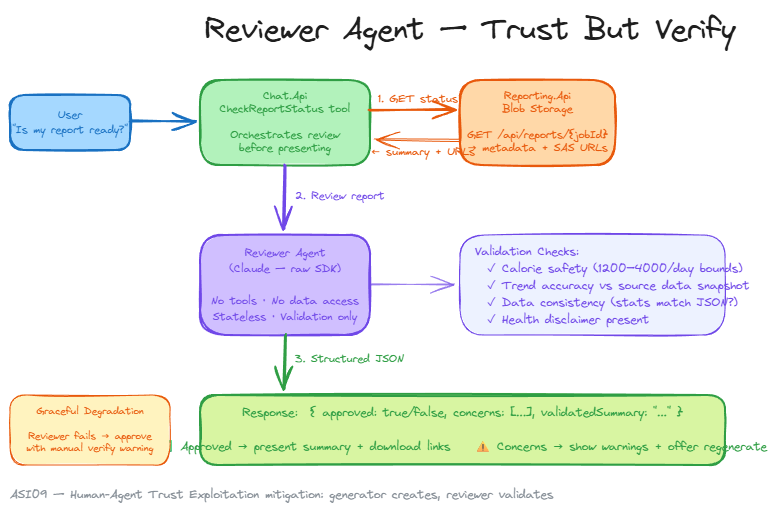
It checks four things: calorie safety bounds (flagging anything outside 1200–4000/day as suspicious), trend accuracy against the source data snapshot, data consistency (do the statistics in the prose actually match the JSON?), and health disclaimer presence. The response is structured JSON: { approved, concerns, validatedSummary }. This keeps the validation deterministic — the reviewer can’t hallucinate approval, it has to justify its assessment.
Graceful degradation is critical here — if the reviewer fails (timeout, API error), the report is still approved, but with a warning: "⚠️ Note: This report could not be independently reviewed. Please verify the data manually." The reviewer uses Anthropic prompt caching (CacheControlEphemeral) on the system prompt for efficiency.
The pattern is simple and powerful: the generator creates, the reviewer validates. Two separate agents with different trust boundaries — a direct mitigation for ASI09 — Human-Agent Trust Exploitation, preventing misleading health advice from reaching the user unchecked.
Lessons learnt
MCP SDK snake_case conversion. The MCP C# SDK auto-converts tool names to snake_case. My ToolPolicyMiddleware allowlist had PascalCase names like GetActivityByDate, but the MCP SDK was registering them as get_activity_by_date. Every tool call was silently flagged as unrecognized in the middleware. This wasn’t an error or an exception, just a warning log that I only discovered after querying Application Insights. Easy to miss, annoying to debug, and a good reminder to always check your tool name format assumptions.
AIAgent is immutable after construction. You can’t add or remove tools from a ChatClientAgent after it’s built. When the MCP Server came online after a degraded start, the agent needed a full rebuild. The ChatAgentProvider and delegating agent pattern was born from this constraint.
Scale-to-zero vs reconnection. The MCP Server Container App ran with minReplicas: 0 to save cost. Cold starts consistently outpaced the 30-second reconnection timer, leaving the agent without tools for minutes at a time. I experimented with faster timers and exponential backoff, but the fundamental issue was that Container Apps cold start times varied too widely. I had to set minReplicas: 1, trading cost for reliability.
Why A2A Didn’t Fit This Architecture
Today, Chat.Api calls Reporting.Api via plain HTTP with an agent identity JWT. It works, it’s simple, and the azp claim validation provides strong caller verification.
The A2A protocol is designed for stateful agent-to-agent task delegation. One agent submits a task, polls with continuation tokens, and eventually gets the final result. MAF’s A2A support (still in preview) provides this through AgentRunMode.AllowBackgroundIfSupported, agent cards for discovery, and ResponseContinuationToken for long-running task lifecycle management. I built the full integration: Reporting.Api exposed an A2A endpoint with an agent card, and Chat.Api used the A2A SDK to submit jobs and poll for completion.
It didn’t work, and the reason was architectural rather than technical. The Chat.Api runs inside an SSE stream to the UI, every tool call blocks that stream. While the A2A tool sat polling (5s, 10s, 20s delays between status checks), no SSE events flowed to the browser. The UI’s HTTP resilience handler hit its timeout and killed the connection. I tried extending timeouts, disabling retries, and increasing circuit breaker windows, but each fix introduced a new constraint.
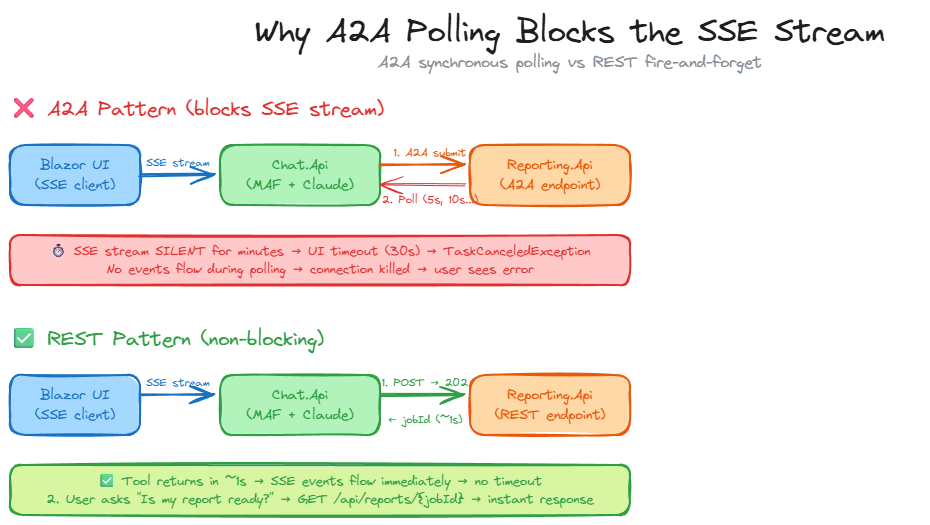
The fundamental mismatch: A2A’s synchronous polling pattern is incompatible with SSE-streamed tool execution where the caller can’t block for minutes without sending events.
The fix was reverting to the original REST pattern. POST /api/reports/generate returns 202 with a job ID in under a second, and GET /api/reports/{jobId} provides status on demand. The user asks the chat agent to check status, which triggers a lightweight tool call that returns almost instantly. No long polling, no blocked SSE streams, no cascading timeouts.
A2A would make sense if Chat.Api had a polling-based UI (not SSE streaming), if it were calling an agent it didn’t own (where discovery and capability negotiation matter), or if MAF supported emitting intermediate SSE events during tool execution. For two services under the same ownership with a simple request-response handoff, REST with agent identity JWTs is the right tool.
Wrapping Up
If there’s one takeaway from building this system, it’s this: use specialized agents for specialized tasks.
MAF handles conversational orchestration with middleware and streaming. The Copilot SDK handles sandboxed code execution with permission gates. Entra Agent ID gives agents real identity: audit trails, kill switches, and cryptographic agent-to-agent authentication without shared secrets. Trying to force everything into a single framework would have meant worse streaming, worse sandboxing, or worse security.
MAF is now GA at v1.0, and the Copilot SDK and Entra Agent Identity are maturing fast. The architectural patterns (specialized agents, identity-based auth, defense in depth) still apply regardless of which SDK version ships next.
If you have any questions, feel free to reach out to me on Bluesky or comment below.
Until next time, Happy coding! 🤓🖥️