Using the Microsoft Agent Framework, we can build agents that interact with our data via chat capabilities. In my personal project, I decided to create a Chat API that allows me to query my data via a chat interface using an LLM. I wasn’t keen on using OpenAI, or even provisioning Microsoft Foundry to create a deployment so that I could use an LLM that they provide. I decided to just grab an API key for Anthropic so that I could use Claude, and hook it up into my agent so I wouldn’t have to worry about managing any Foundry infrastructure.
So in this post, we’ll walk through how I created a health data chat agent using the Microsoft Agent Framework that’s powered by Claude.
If you want to see the code for this, please check it out on my GitHub
Microsoft Agent Framework vs Direct Claude SDK
C# is the primary language for this project, which is one of the first-class languages that the Agent Framework supports. The Microsoft Agent Framework is the next evolution from both Semantic Kernel and AutoGen, built by the same Microsoft teams.
It provides a unified AIAgent abstraction that works across multiple LLM providers (OpenAI, Anthropic, etc.). Agent Framework also handles the full tool-call cycle for you. So instead of setting up manual tool loops using the Anthropic .NET SDK like this:
var client = new AnthropicClient { ApiKey = apiKey };
var messages = new List<Message> { new("user", userInput) };

while (true)
{
    var response = await client.Messages.CreateAsync(new()
    {
        Model = "claude-sonnet-4-6",
        Messages = messages,
        Tools = toolDefinitions,
        System = systemPrompt
    });

    messages.Add(new("assistant", response.Content));

    if (response.StopReason != "tool_use")
        break;

    // Manually extract tool calls, invoke them, build tool_result blocks
    foreach (var toolUse in response.Content.OfType<ToolUseContent>())
    {
        var result = await InvokeTool(toolUse.Name, toolUse.Input);
        messages.Add(new("user", new ToolResultContent(toolUse.Id, result)));
    }
}
We can set up our agent like so, and use RunStreamingAsync() to call the tool, feed the result to Claude, and then continue:
// Agent Framework approach
AnthropicClient anthropicClient = new() { ApiKey = apiKey };

AIAgent chatAgent = anthropicClient.AsAIAgent(
    model: "claude-sonnet-4-6",
    name: "BiotrackrChatAgent",
    instructions: systemPrompt,
    tools: [ AIFunctionFactory.Create(myTools.GetData) ]
);

await foreach (var update in chatAgent.RunStreamingAsync(messages))
{
    Console.Write(update);
}
Setting up the Anthropic Provider
We can use Anthropic clients in our Agents by installing the following NuGet package:
dotnet add package Microsoft.Agents.AI.Anthropic --prerelease
This will give us the .AsAIAgent() extension method that we can apply to an AnthropicClient, as it will convert the client into an AIAgent instance that supports function tools, streaming, and middleware. So within my Chat API Program.cs file, we can wire it up like so:
using Anthropic;
using Microsoft.Agents.AI;
using Microsoft.Extensions.AI;

// Read configuration from Azure App Configuration
var anthropicApiKey = builder.Configuration.GetValue<string>("Biotrackr:AnthropicApiKey");
var modelName = builder.Configuration.GetValue<string>("Biotrackr:ChatAgentModel");
var systemPrompt = builder.Configuration.GetValue<string>("Biotrackr:ChatSystemPrompt")!;

// Create the Anthropic client and convert it to an AIAgent
AnthropicClient anthropicClient = new() { ApiKey = anthropicApiKey };

AIAgent chatAgent = anthropicClient.AsAIAgent(
    model: modelName,  // E.g. "claude-sonnet-4-6"
    name: "BiotrackrChatAgent",
    instructions: systemPrompt,
    tools:
    [
        AIFunctionFactory.Create(activityTools.GetActivityByDate),
        AIFunctionFactory.Create(activityTools.GetActivityByDateRange),
        AIFunctionFactory.Create(activityTools.GetActivityRecords),
        AIFunctionFactory.Create(sleepTools.GetSleepByDate),
        AIFunctionFactory.Create(sleepTools.GetSleepByDateRange),
        AIFunctionFactory.Create(sleepTools.GetSleepRecords),
        AIFunctionFactory.Create(weightTools.GetWeightByDate),
        AIFunctionFactory.Create(weightTools.GetWeightByDateRange),
        AIFunctionFactory.Create(weightTools.GetWeightRecords),
        AIFunctionFactory.Create(foodTools.GetFoodByDate),
        AIFunctionFactory.Create(foodTools.GetFoodByDateRange),
        AIFunctionFactory.Create(foodTools.GetFoodRecords),
    ]);
Let’s break down each parameter:
model: The Claude model identifier.name: A human-readable identifier for the agent, used in telemetry and logging.instructions: The system prompt. This is sent as Claude’ssystemparameter on every request.tools: An array ofAIFunctioninstances.AIFunctionFactory.Create()uses reflection to inspect the C# method signature, including[Description]attributes on the method and its parameters, to automatically generate the JSON schema that Claude needs. No manual schema authoring required.
Current Limitations: Tool Support with the Anthropic Provider
As of writing this blog post, The Anthropic provider for Microsoft Agent Framework doesn’t have feature parity with the OpenAI provider yet. It has support for Function Tools, but code interpreters, hosted and local MCP tools, web search, tool approval and file searching capabilities are not supported yet.
This is a little bit of an issue for me, as I’ve developed an MCP server for this side project that I was hoping to integrate into my agent.
However, we can use Function Tools that call our various APIs directly via HttpClient that essentially act as the MCP Server. It’s code duplication that’s not ideal, but weighing it up against provisioning my own Foundry instance and deploying an OpenAI model to use instead, I thought it was worth the duplication.
Defining our Function Tools.
Function Tools are the mechanism by which Claude can interact with external systems. In the Agent Framework, they’re plain C# methods decorated with [Description] attributes. The framework inspects these at startup and generates the tool schema that Claude uses to decide when and how to call them.
Here’s the ActivityTools class from Biotrackr:
using System.ComponentModel;
using Microsoft.Extensions.Caching.Memory;

public class ActivityTools(IHttpClientFactory httpClientFactory, IMemoryCache cache)
{
    [Description("Get activity data (steps, calories, distance) for a specific date. " +
                 "Date format: YYYY-MM-DD.")]
    public async Task<string> GetActivityByDate(
        [Description("The date to get activity data for, in YYYY-MM-DD format")]
        string date)
    {
        if (!DateOnly.TryParse(date, out _))
            return """{"error": "Invalid date format. Use YYYY-MM-DD."}""";

        var cacheKey = $"activity:{date}";
        if (cache.TryGetValue(cacheKey, out string? cached))
            return cached!;

        var client = httpClientFactory.CreateClient("BiotrackrApi");
        var response = await client.GetAsync($"/activity/{date}");

        if (!response.IsSuccessStatusCode)
            return $"""{"error": "Activity data not found for {date}."}""";

        var result = await response.Content.ReadAsStringAsync();

        var ttl = DateOnly.Parse(date) == DateOnly.FromDateTime(DateTime.UtcNow)
            ? TimeSpan.FromMinutes(5)    // Today's data — short TTL
            : TimeSpan.FromHours(1);     // Historical data — long TTL
        cache.Set(cacheKey, result, ttl);

        return result;
    }

    [Description("Get activity data for a date range. Maximum 365 days. " +
                 "Date format: YYYY-MM-DD.")]
    public async Task<string> GetActivityByDateRange(
        [Description("The start date, in YYYY-MM-DD format")] string startDate,
        [Description("The end date, in YYYY-MM-DD format")] string endDate)
    {
        // Validation, caching, and API call follow the same pattern...
    }

    [Description("Get paginated activity records. Returns the most recent records " +
                 "by default.")]
    public async Task<string> GetActivityRecords(
        [Description("Page number (default: 1)")] int pageNumber = 1,
        [Description("Page size (default: 10, max: 50)")] int pageSize = 10)
    {
        pageSize = Math.Min(pageSize, 50);
        // ...
    }
}
A few things to note about this pattern:
The [Description] attributes are critical, as they help Claude understand what each tool does and what each parameter means. Good descriptions lead to better tool selection. Bad ones lead to Claude calling the wrong tool or passing malformed arguments.
Tools are constructor-injected with IHttpClientFactory and IMemoryCache. The tools don’t call databases directly. They call Biotrackr’s existing health data APIs through Azure API Management (APIM). This keeps the tools thin and decoupled from the data layer.
Biotrackr has 12 tools total. Three per domain (ByDate, ByDateRange, Records) across four domains (activity, sleep, weight, food). Each tool class (e.g., SleepTools, WeightTools, FoodTools) follows the exact same pattern as ActivityTools. This consistency helps Claude learn the tool interface quickly, the descriptions follow a uniform style, and the parameter shapes are predictable.
Input validation happens inside the tool, not in the framework. Claude might pass "yesterday" instead of "2026-03-09". The DateOnly.TryParse check catches this and returns a structured error that Claude can use to self-correct.
Streaming with AG-UI Protocol
With our agent configured, I needed a way to consume the output generated from the agent. I have a UI chat feature that uses the AG-UI (Agent User Interaction) protocol, a standardised server-sent events (SSE) protocol for agent-to-UI streaming developed by CopilotKit.
The Agent Framework includes an ASP.NET Core hosting package, Microsoft.Agents.AI.Hosting.AGUI.AspNetCore, that exposes an agent as an AG-UI-compatible SSE endpoint in a single line. In our Chat API Program.cs file, I’ve wired it up like so:
// Register AG-UI services
builder.Services.AddAGUI();

var app = builder.Build();

// Expose the agent as an AG-UI endpoint
app.MapAGUI("/", persistentAgent);
The MapAGUI() handles:
- Accepting POST requests with the AG-UI payload (session ID, messages, etc.).
- Running the agent via
RunStreamingAsync. - Formatting each
AgentResponseUpdateas an SSE event. - Session lifecycle management.
On the client side, the UI doesn’t need custom SSE parsing. It consumes standard AG-UI events. This makes it straightforward to build a Blazor, React, or any other frontend that speaks the AG-UI protocol.
Chat Agent in Action
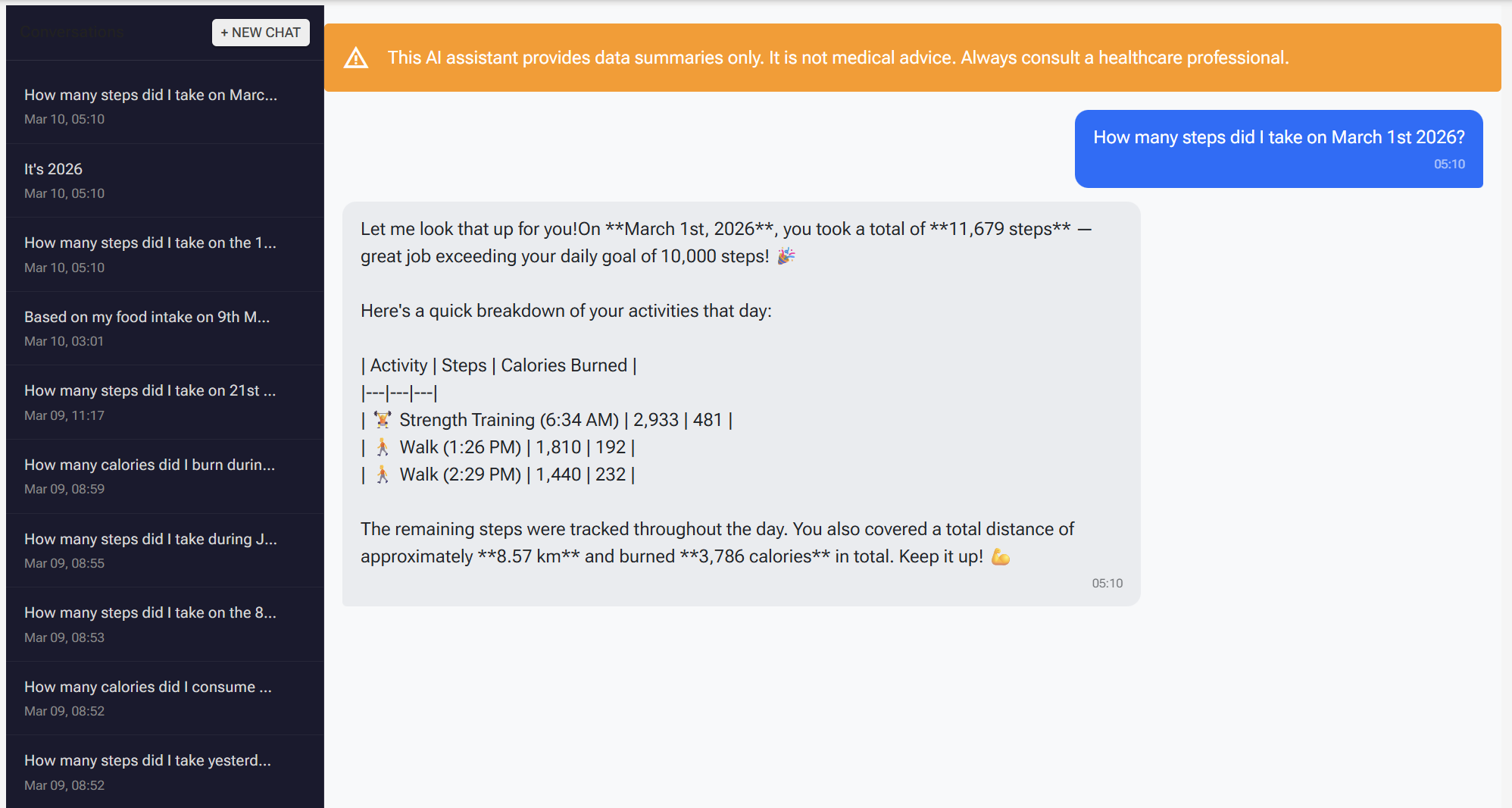
Here’s what this all looks like in my dashboard. In the screenshot above, I’m asking the agent about my activity data and it responds with a summary pulled directly from Biotrackr’s APIs. Behind the scenes, the agent receives my message, determines which tool to call (in this case, one of the activity tools), invokes the API through the function tool, and streams the response back to the UI via the AG-UI protocol.
The entire round trip, from user message to streamed response, is handled by the framework. The agent selects the right tool based on Claude’s interpretation of the question, calls the underlying API, and formats the result into a natural language response. If I ask a follow-up question about the same data, the in-memory cache kicks in and the tool returns the cached result instead of hitting the API again.
What I like about this setup is that the chat interface feels responsive despite the number of moving parts underneath. The AG-UI streaming means the response starts appearing in the UI as soon as Claude begins generating it, rather than waiting for the full response to complete. It makes the agent feel snappy, even when it needs to make multiple tool calls to answer a complex question.
Designing a System Prompt for Biotrackr
The system prompt defines the agent’s personality, capabilities, and constraints. For a health data agent (even for a little side project that taps into my FitBit data), getting this right matters! You want the agent to be helpful but not dangerous.
In Biotrackr, the system prompt is stored in Azure App Configuration which is defined in my Bicep code, but I uploaded the prompt via the CLI. I haven’t quite tackled the versioning problem for the system prompt yet. I want to be able to view past versions without committing it directly to a public GitHub repository (never a good idea), and still control it as part of my CI/CD. A challenge for another time.
Anyway, here’s a basic sample of what my system prompt for my agent looks like:
You are the Biotrackr health and fitness assistant. You help the user
understand their health data by querying activity, sleep, weight, and food
records using the available tools. Always use the tools to retrieve data
before answering. Present data clearly and concisely. You are not a medical
professional — remind users to consult a healthcare provider for medical
advice.
Several design decisions here:
-
Tool-dependent: “Always use the tools to retrieve data before answering” prevents the agent from hallucinating health data. LLMs hallucinate, so we want to make sure that our tools are invoked by the LLM to ensure that they have access to the actual data, rather than just make it up themselves. By instructing Claude to always call tools first, we force it to ground every response in real data.
-
Data-only, no medical advice: Claude is instructed to redirect medical questions to healthcare providers. This is an OWASP control specific to agents. Don’t blindly trust an agent with healthcare advice!
-
Scope limitations: The prompt explicitly constrains what the agent can do; query health data, nothing more. It cannot modify data, access external URLs, or execute code. This is an OWASP Agentic Security (ASI02) mitigation against tool misuse. Even if a prompt injection attempts to redirect the agent, the system prompt establishes hard boundaries. All 12 tools are read-only GET operations by design. No POST, PUT, or DELETE tools exist.
-
Externalized configuration: Storing the prompt in Azure App Configuration (backed by Key Vault for secrets) means you can iterate on prompt wording, add new behavioral rules, or adjust the agent’s personality without rebuilding and redeploying the container. This is also an OWASP Agentic Security (ASI01) mitigation. If the prompt is hijacked or needs emergency changes, you can update it in seconds.
Cost and Model Considerations
Running Claude in production means thinking about costs. Here’s what Biotrackr’s setup looks like.
Model Selection
Claude offers several models with different price/performance trade-offs. At the time of writing, Opus is the most capable (I’ve been using it for work a LOT! Very powerful with the right (i.e. Human) guidance). Sonnet does just as well, and Haiku is pretty fast. I’m not going to tell you which one Biotrackr uses, but have a play around with each model and decide which one works for you.
Alternatively, you can provision Anthropic models via Foundry, but to use Claude models in Microsoft Foundry, you need a paid Azure subscription with a billing account in a country or region where Anthropic offers the models for purchase.
This application is deployed in a benefit subscription, so I just grabbed an API Key from the Claude Developer portal.
Prompt Caching
The Anthropic API supports prompt caching, where repeated, identical prefixes (like the system prompt and tool definitions) are cached at 10% of the normal input token cost. Biotrackr’s system prompt plus 12 tool definitions total roughly 2,500 tokens. Since these are identical across every conversation, prompt caching provides meaningful savings (approximately 25% reduction on input costs for a typical conversation).
In-Memory Tool Result Caching
On the application side, Biotrackr caches API responses with adaptive TTLs:
var ttl = DateOnly.Parse(date) == DateOnly.FromDateTime(DateTime.UtcNow)
    ? TimeSpan.FromMinutes(5)    // Today's data — short TTL
    : TimeSpan.FromHours(1);     // Historical data — long TTL
cache.Set(cacheKey, result, ttl);
Today’s data gets a 5-minute TTL (it might update throughout the day), while historical data gets a 1-hour TTL (it’s unlikely to change). Date range queries use a 30-minute TTL, and paginated record queries use 15 minutes. This prevents redundant API calls when Claude invokes the same tool multiple times within a conversation, which happens more often than you’d expect, especially when the user asks follow-up questions about the same data.
Rough Monthly Estimates
At moderate usage (roughly 15 conversations per day, averaging 4 messages per conversation):
- Claude Sonnet 4.6: ~$8–12/month (with prompt caching)
- Claude Haiku 4.5: ~$2–4/month (with prompt caching)
These are rough estimates and will vary based on conversation complexity, tool call frequency, and response length. Check the Anthropic pricing page for current rates.
One additional cost factor to be aware of: Claude’s tool use adds approximately 346 tokens per request for the internal tool system prompt. With 12 tools defined, the tool definitions themselves add roughly 2,000 tokens to every request. Combined with the system prompt, that’s ~2,500 tokens of fixed overhead before any conversation content. Prompt caching mitigates this significantly. Those tokens are identical across requests and cached at 10% of the input cost.
Caveats and Known Limitations
Before adopting this stack, there are a few things worth knowing.
The Agent Framework packages are still in preview. At the time of writing, the core packages are at 1.0.0-rc3 and the hosting packages are at 1.0.0-preview. The API surface may change before GA, so just be prepared for any API changes 😄.
The Anthropic provider is newer than the OpenAI provider. If you hit issues with the Anthropic integration, you have a fallback: drop down to the Anthropic .NET SDK directly and implement the manual tool loop (as shown in the comparison earlier in this post). It’s more code, but it decouples you from the Agent Framework’s Anthropic provider entirely.
Anthropic enforces rate limits by tier. At Tier 1 (the default for new accounts), you get 60 requests per minute. For a personal project like mine, that’s more than enough. For production use with multiple concurrent users, you’ll want to request a higher tier or implement request queuing.
Claude sometimes passes natural language dates. In my testing, Claude occasionally sends "yesterday" or "last week" as a date parameter instead of a properly formatted "2026-03-09" string. This is why input validation in every tool function is essential. The DateOnly.TryParse check catches this and returns a structured error that Claude uses to self-correct on the next attempt. It almost always gets it right the second time.
Wrapping Up
With fewer than 150 lines in Program.cs, Biotrackr now has an Anthropic-backed AIAgent with 12 function tools across 4 health data domains, streaming responses via the AG-UI protocol, configuration-driven system prompt and model selection, and in-memory caching to keep costs down.
The Microsoft Agent Framework handled the hard parts: the tool-call loop, streaming infrastructure, and protocol formatting. The application code focuses entirely on the domain: what tools to expose, how to cache results, and how to constrain the agent’s behaviour through the system prompt.
The framework’s provider-agnostic design also means this isn’t a one-way door. If I want to switch from Claude to Azure OpenAI (or any other provider) in the future, the tool definitions, middleware, and streaming setup all stay the same, only the client setup changes.
If you want to dive deeper into some of the concepts I talked about in this post, please check out the following resources:
- Microsoft Agent Framework — GitHub
- Microsoft.Agents.AI.Anthropic — NuGet
- Anthropic Claude API documentation
- Anthropic .NET SDK — GitHub
- AG-UI Protocol documentation
- Anthropic pricing
- Biotrackr source code — GitHub
If you have any questions about the content here, please feel free to reach out to me on Bluesky or comment below.
Until next time, Happy coding! 🤓🖥️