When I first built an AI Agent for my personal health platform Biotrackr, I used the Microsoft Agent Framework’s function tool pattern with 12 tools decorated with [Description] attributes, registered via AIFunctionFactory.Create().
This wasn’t ideal as I already had an MCP Server exposing the same 12 tools to VS Code and other MCP clients. The natural approach would have been to make the Chat API another MCP client.
But there was a blocker. The Anthropic provider in Microsoft Agent Framework (Microsoft.Agents.AI.Anthropic) didn’t support Local MCP Tools. If I wanted to use Claude as the LLM backend (which I did), function tools were the only option. So I duplicated all 12 tool implementations in the Chat API, complete with their own models, validation logic, and API call code.
With the release of Microsoft.Agents.AI.Anthropic 1.0.0-rc4, that limitation was removed! Local MCP Tools are now fully supported with the Anthropic provider. The Model Context Protocol (MCP) was always the right architecture, a single MCP Server as the source of truth for all tool consumers. The provider limitation just delayed when I could adopt it for my agent.
In this post, I’ll walk through the migration from function tools to MCP client integration, the lessons learned along the way, and the pitfalls to watch out for with the MCP C# SDK.
If you want to see the code for this, check it out on my GitHub.
The Before: Function Tools with AIFunctionFactory
The original Chat API defined 12 tool methods across 4 classes (ActivityTools, SleepTools, WeightTools, FoodTools). Each class made HTTP calls to the Biotrackr APIs via a named HttpClient, with caching:
public class ActivityTools(IHttpClientFactory httpClientFactory, IMemoryCache cache)
{
    [Description("Get activity data for a specific date. Date format: YYYY-MM-DD.")]
    public async Task<string> GetActivityByDate(
        [Description("The date to get activity data for")] string date)
    {
        if (!DateOnly.TryParse(date, out _))
            return """{"error": "Invalid date format. Use YYYY-MM-DD."}""";

        var cacheKey = $"activity:{date}";
        if (cache.TryGetValue(cacheKey, out string? cached))
            return cached!;

        var client = httpClientFactory.CreateClient("BiotrackrApi");
        var response = await client.GetAsync($"/activity/{date}");

        var result = await response.Content.ReadAsStringAsync();
        var sanitized = SanitizeResponse<ActivityItem>(result, "activity");

        var ttl = DateOnly.Parse(date) == DateOnly.FromDateTime(DateTime.UtcNow)
            ? TimeSpan.FromMinutes(5)
            : TimeSpan.FromHours(1);
        cache.Set(cacheKey, sanitized, ttl);

        return sanitized;
    }
}
These tools were registered in Program.cs:
var activityTools = new ActivityTools(httpClientFactory, memoryCache);
// ... 3 more tool classes

AIAgent chatAgent = anthropicClient.AsAIAgent(
    model: modelName,
    instructions: systemPrompt,
    tools:
    [
        AIFunctionFactory.Create(activityTools.GetActivityByDate),
        AIFunctionFactory.Create(activityTools.GetActivityByDateRange),
        AIFunctionFactory.Create(activityTools.GetActivityRecords),
        // ... 9 more tools
    ]);
This worked, but the same 12 tool operations existed independently in the Biotrackr MCP Server project, complete with their own models, validation logic, and API call code.
Why Function Tools in the First Place?
When I first built the Chat API in early March 2026, I evaluated three approaches for tool integration:
- Function Tools (chosen) — Reimplement the 12 MCP tools as C# methods using
AIFunctionFactory.Create(). Simple, self-contained, no external dependencies. - Switch to Azure OpenAI — The OpenAI provider supported Local MCP Tools natively, but not Claude, which wasn’t ideal.
- MCP client bridge — Manually discover MCP tools at startup and convert each
McpClientToolinto anAIFunction. Fragile and unsupported.
I chose Option 1 because it was the simplest path that preserved Claude as the LLM. The cost was code duplication — 12 tools implemented independently in both the Chat API and the MCP Server, with their own models, validation, and API call logic.
Two weeks later, Microsoft.Agents.AI.Anthropic 1.0.0-rc4 shipped with Local MCP Tool support. The blocker was gone, and Option 3 was now officially supported by the framework.
The After: MCP Client Integration
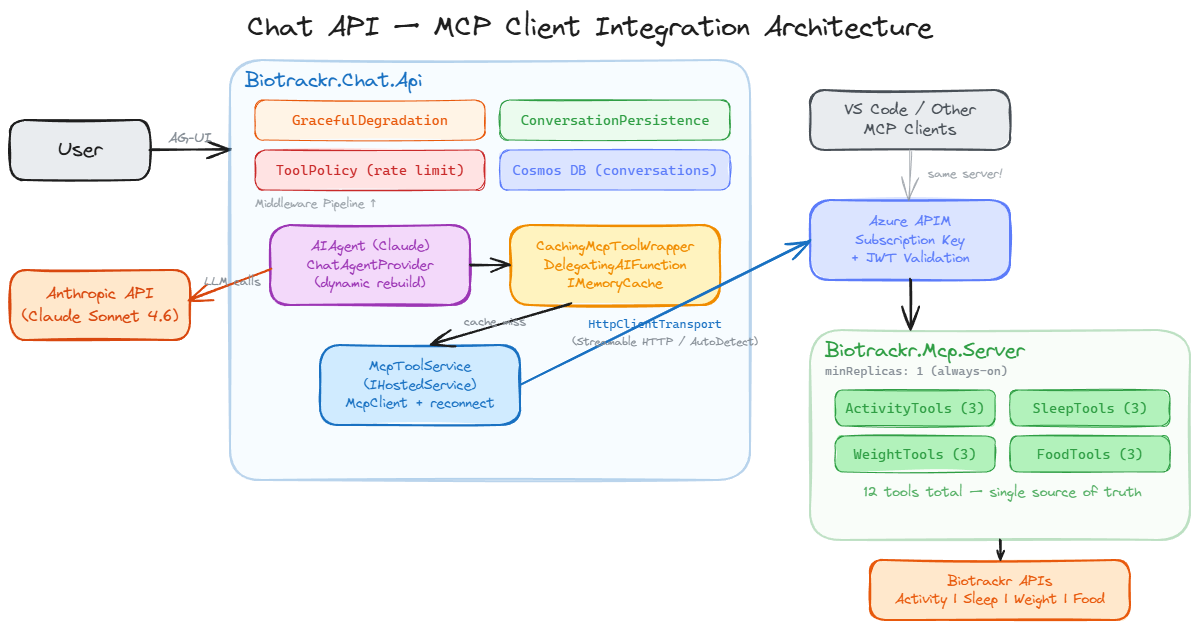
The new architecture has the Chat API consuming the MCP Server as a client:
McpToolService: Managing the MCP Connection
The McpToolService is a singleton IHostedService that manages the MCP client lifecycle. It’s registered in DI as both the IMcpToolService interface (for consumers like ChatAgentProvider) and as a hosted service (for startup/shutdown lifecycle):
// Program.cs
builder.Services.AddSingleton<IMcpToolService, McpToolService>();
builder.Services.AddHostedService(sp => (McpToolService)sp.GetRequiredService<IMcpToolService>());
On startup, the service attempts to connect to the MCP Server via HttpClientTransport through the APIM gateway. The APIM subscription key is injected via AdditionalHeaders on the transport options. This replaces the ApiKeyDelegatingHandler I had previously with a much cleaner approach, since the MCP SDK supports custom headers natively:
private async Task TryConnectAsync(CancellationToken cancellationToken)
{
    if (IsConnected || _disposed || string.IsNullOrWhiteSpace(_settings.McpServerUrl))
        return;

    if (!await _connectLock.WaitAsync(0, cancellationToken))
        return; // Another attempt is already in progress

    try
    {
        if (IsConnected) return;

        var transportOptions = new HttpClientTransportOptions
        {
            Endpoint = new Uri(_settings.McpServerUrl),
            TransportMode = HttpTransportMode.AutoDetect,
        };

        var headers = new Dictionary<string, string>();

        if (!string.IsNullOrWhiteSpace(_settings.ApiSubscriptionKey))
        {
            headers["Ocp-Apim-Subscription-Key"] = _settings.ApiSubscriptionKey;
        }

        if (!string.IsNullOrWhiteSpace(_settings.McpServerApiKey))
        {
            headers["X-Api-Key"] = _settings.McpServerApiKey;
        }

        if (headers.Count > 0)
        {
            transportOptions.AdditionalHeaders = headers;
        }

        var transport = new HttpClientTransport(transportOptions, _loggerFactory);
        var client = await McpClient.CreateAsync(transport, loggerFactory: _loggerFactory,
            cancellationToken: cancellationToken);

        var tools = await client.ListToolsAsync(cancellationToken: cancellationToken);
        _mcpClient = client;
        _tools = tools.ToList<AITool>();
        IsConnected = true;

        _logger.LogInformation("Connected to MCP Server — {ToolCount} tools available: {ToolNames}",
            _tools.Count, string.Join(", ", _tools.Select(t => t.Name)));
    }
    catch (Exception ex)
    {
        _logger.LogWarning(ex, "MCP Server connection attempt failed");
    }
    finally
    {
        _connectLock.Release();
    }
}
A few things to note about the connection logic:
SemaphoreSlimguards concurrent connection attempts — without this, multiple requests hittingGetToolsAsync()simultaneously could race and create multipleMcpClientinstances. TheWaitAsync(0)means non-blocking: if another attempt is in progress, the caller gets the current (possibly empty) tool list rather than waiting.- Degraded mode is the default — if the MCP Server is unreachable at startup, the service logs a warning and moves on. The app starts with zero tools. Chat requests still function, the LLM just can’t call any tools and responds conversationally.
- A reconnection timer fires every 30 seconds — this handles transient failures like Container App deployments or network blips. When it reconnects, the
ChatAgentProviderpicks up the new tools on the next request and rebuilds the agent.
Caching with DelegatingAIFunction
I preserved the original caching strategy by wrapping each MCP tool with a DelegatingAIFunction. This was one of the trickiest parts of the migration.
The wrapper is a static CachingMcpToolWrapper class with a single Wrap method that takes an AITool and returns a cached version:
public static class CachingMcpToolWrapper
{
    public static AITool Wrap(AITool innerTool, IMemoryCache cache, ILogger logger)
    {
        return new CachingDelegatingFunction((AIFunction)innerTool, cache, logger);
    }
}
The CachingDelegatingFunction itself extends DelegatingAIFunction, which is the key to preserving the original McpClientTool’s Name, Description, JsonSchema, and parameter metadata:
internal sealed class CachingDelegatingFunction(
    AIFunction innerFunction, IMemoryCache cache, ILogger logger)
    : DelegatingAIFunction(innerFunction)
{
    protected override async ValueTask<object?> InvokeCoreAsync(
        AIFunctionArguments arguments, CancellationToken cancellationToken)
    {
        var cacheKey = CachingMcpToolWrapper.DeriveCacheKey(Name, arguments);

        if (cache.TryGetValue(cacheKey, out string? cachedResult))
        {
            logger.LogDebug("Cache hit for {ToolName} with key {CacheKey}", Name, cacheKey);
            return cachedResult!;
        }

        var result = await base.InvokeCoreAsync(arguments, cancellationToken);
        var resultString = result?.ToString() ?? string.Empty;

        var ttl = CachingMcpToolWrapper.DetermineTtl(Name, arguments);
        cache.Set(cacheKey, resultString, ttl);

        return resultString;
    }
}
Cache keys are derived deterministically from the tool name and arguments. Since MCP SDK 1.1.0 converts tool names to snake_case, the key derivation uses string matching against the snake_case names:
public static string DeriveCacheKey(string toolName, AIFunctionArguments args)
{
    if (toolName.Contains("by_date") && !toolName.Contains("by_date_range"))
    {
        var date = GetArgValue(args, "date");
        return $"{toolName}:{date}";
    }

    if (toolName.Contains("by_date_range"))
    {
        var startDate = GetArgValue(args, "startDate", GetArgValue(args, "start_date"));
        var endDate = GetArgValue(args, "endDate", GetArgValue(args, "end_date"));
        var pageNumber = GetArgValue(args, "pageNumber", GetArgValue(args, "page_number", "1"));
        var pageSize = GetArgValue(args, "pageSize", GetArgValue(args, "page_size", "20"));
        return $"{toolName}:{startDate}:{endDate}:{pageNumber}:{pageSize}";
    }

    if (toolName.Contains("records"))
    {
        var pageNumber = GetArgValue(args, "pageNumber", GetArgValue(args, "page_number", "1"));
        var pageSize = GetArgValue(args, "pageSize", GetArgValue(args, "page_size", "20"));
        return $"{toolName}:{pageNumber}:{pageSize}";
    }

    return toolName;
}
Notice the dual argument name checks (startDate and start_date). This is defensive coding because the MCP SDK might convert parameter names to snake_case as well, and I wasn’t sure which format the arguments would arrive in. In practice, Claude sends the arguments with the exact names from the JSON schema, but handling both cases means I don’t have to worry about it.
TTLs match the original per-tool caching strategy: 5 minutes for today’s data (it might change with new activity), 1 hour for historical dates, 30 minutes for date ranges, and 15 minutes for paginated records.
Dynamic Agent Rebuild
Since the AIAgent is immutable once constructed (its tool list is locked in at creation time), I needed a way to swap in a new agent when the MCP tool set changes — for example, when the MCP Server comes online after a degraded start.
The ChatAgentProvider handles this. It wraps MCP tools with the caching layer, creates a new AnthropicClient, builds the AIAgent, and attaches the full middleware pipeline, all in a thread-safe manner with a SemaphoreSlim and double-check locking:
public async Task<AIAgent> GetAgentAsync(CancellationToken cancellationToken = default)
{
    var tools = await _mcpToolService.GetToolsAsync(cancellationToken);
    var toolCount = tools.Count;

    // Fast path: agent exists and tool count hasn't changed
    if (_currentAgent is not null && toolCount == _lastToolCount)
        return _currentAgent;

    await _buildLock.WaitAsync(cancellationToken);
    try
    {
        // Double-check after acquiring lock
        if (_currentAgent is not null && toolCount == _lastToolCount)
            return _currentAgent;

        _currentAgent = BuildAgent(tools);
        _lastToolCount = toolCount;
        return _currentAgent;
    }
    finally
    {
        _buildLock.Release();
    }
}
The BuildAgent method is where the agent is actually assembled. It wraps each MCP tool with caching, creates the Anthropic client, and stacks up the middleware pipeline:
private AIAgent BuildAgent(IList<AITool> mcpTools)
{
    var wrappedTools = mcpTools
        .Select(tool => CachingMcpToolWrapper.Wrap(tool, _memoryCache, cachingLogger))
        .ToList();

    AnthropicClient anthropicClient = new() { ApiKey = _settings.AnthropicApiKey };

    AIAgent chatAgent = anthropicClient.AsAIAgent(
        model: _settings.ChatAgentModel,
        name: "BiotrackrChatAgent",
        instructions: _settings.ChatSystemPrompt,
        tools: [.. wrappedTools]);

    return chatAgent
        .AsBuilder()
            .Use(runFunc: null, runStreamingFunc: toolPolicyMiddleware.HandleAsync)
            .Use(runFunc: null, runStreamingFunc: persistenceMiddleware.HandleAsync)
            .Use(runFunc: null, runStreamingFunc: degradationMiddleware.HandleAsync)
        .Build();
}
The problem is that MapAGUI (which sets up the AG-UI SSE streaming endpoint) requires a static AIAgent instance at startup. It doesn’t accept a factory or delegate. So Program.cs uses a delegating wrapper, a shell agent that intercepts every streaming request and routes it to the latest real agent:
var agentProvider = app.Services.GetRequiredService<ChatAgentProvider>();
var initialAgent = await agentProvider.GetAgentAsync();

// Shell agent that delegates to the latest real agent on every request
AIAgent dynamicAgent = initialAgent
    .AsBuilder()
    .Use(runFunc: null, runStreamingFunc: (messages, session, options, innerNext, cancellationToken) =>
    {
        return agentProvider.RunStreamingWithLatestAgentAsync(messages, session, options, cancellationToken);
    })
    .Build();

app.MapAGUI("/", dynamicAgent);
The RunStreamingWithLatestAgentAsync method resolves the current agent and streams its response — if the MCP Server came online since the last request, the user gets the full tool set without a restart:
public async IAsyncEnumerable<AgentResponseUpdate> RunStreamingWithLatestAgentAsync(
    IEnumerable<ChatMessage> messages,
    AgentSession? session,
    AgentRunOptions? options,
    [EnumeratorCancellation] CancellationToken cancellationToken)
{
    var currentAgent = await GetAgentAsync(cancellationToken);
    await foreach (var update in currentAgent.RunStreamingAsync(messages, session, options, cancellationToken))
    {
        yield return update;
    }
}
Lessons Learned (The Hard Way)
1. MCP SDK 1.1.0 Converts Tool Names to snake_case
This was the most unexpected gotcha. The MCP C# SDK automatically converts C# method names to snake_case when registering tools on the server side and when listing tools on the client side:
| C# Method Name | MCP Tool Name |
|---|---|
GetActivityByDate |
get_activity_by_date |
GetSleepByDateRange |
get_sleep_by_date_range |
GetFoodRecords |
get_food_records |
This is standard MCP convention, tool names are snake_case across all SDKs, but it caught me because the previous function tools used PascalCase names (they were just C# method names). My ToolPolicyMiddleware has an AllowedToolNames HashSet that acts as a tool allowlist. It was still configured with PascalCase names:
// ❌ What I had — PascalCase names from the function tool era
public HashSet<string> AllowedToolNames { get; set; } =
[
    "GetActivityByDate", "GetActivityByDateRange", "GetActivityRecords",
    // ...
];
Every tool call was silently blocked. The agent would ask Claude to call a tool, Claude would respond with get_activity_by_date, the middleware would check the allowlist, find no match, and log the rejection. The user saw generic error messages with no indication of what went wrong. I only caught this by querying Application Insights:
Blocked unrecognised tool call: get_activity_by_date in session {SessionId}
The fix was to update ToolPolicyOptions to use the snake_case names:
// ✅ Updated to match MCP wire-format names
public HashSet<string> AllowedToolNames { get; set; } =
[
    "get_activity_by_date", "get_activity_by_date_range", "get_activity_records",
    "get_sleep_by_date", "get_sleep_by_date_range", "get_sleep_records",
    "get_weight_by_date", "get_weight_by_date_range", "get_weight_records",
    "get_food_by_date", "get_food_by_date_range", "get_food_records"
];
Lesson: Check the actual MCP wire-format tool names, not the C# method names. Log the tool names at startup so you can verify them.
2. Don’t Use AIFunctionFactory.Create for Tool Wrappers
My first caching wrapper used AIFunctionFactory.Create with a lambda. The idea was simple: create a new function with the same name and description, but with caching logic around the actual invocation:
// ❌ This loses the original tool's parameter schema
return AIFunctionFactory.Create(
    method: async (AIFunctionArguments args, CancellationToken ct) =>
    {
        var result = await innerFunction.InvokeAsync(args, ct);
        // ... cache logic
    },
    name: innerTool.Name,
    description: innerTool.Description);
This compiles. But in production, the AI agent can’t invoke the tool because the wrapper has no parameter metadata.
Here’s why: when AIFunctionFactory.Create wraps a lambda that takes AIFunctionArguments, it generates a JsonSchema based on the lambda’s parameter signature. The lambda signature is (AIFunctionArguments, CancellationToken), there’s no date parameter, no startDate parameter, nothing. The original MCP tool’s schema (which says “this tool takes a date string in YYYY-MM-DD format”) is completely lost. Claude sees a tool with a name and description but no parameters, so it can’t generate the arguments.
The error in Application Insights was:
System.ArgumentException: The arguments dictionary is missing a value
for the required parameter 'date'. (Parameter 'arguments')
This is especially insidious because the wrapper correctly copies Name and Description. So in logs and debugging, everything looks right. The missing JsonSchema is invisible unless you inspect the tool’s metadata directly.
The fix: Use DelegatingAIFunction, which inherits all metadata from the inner function, including the JsonSchema and parameter definitions:
// ✅ This preserves Name, Description, JsonSchema, and parameter metadata
internal sealed class CachingDelegatingFunction(AIFunction innerFunction, ...)
    : DelegatingAIFunction(innerFunction)
{
    protected override async ValueTask<object?> InvokeCoreAsync(
        AIFunctionArguments arguments, CancellationToken cancellationToken)
    {
        // Cache logic here, calling base.InvokeCoreAsync for cache misses
    }
}
DelegatingAIFunction is essentially the decorator pattern for AIFunction. It delegates all property access (Name, Description, JsonSchema, Parameters) to the inner function, and only overrides InvokeCoreAsync. This is the correct extension point for adding cross-cutting concerns like caching, logging, or retry logic around tool invocations.
3. Streamable HTTP vs SSE Transport
The MCP specification has two HTTP transport modes: the newer Streamable HTTP protocol (a single endpoint that accepts JSON-RPC over HTTP POST) and the older SSE transport (two endpoints: /sse for server-sent events and /messages for client requests).
The Biotrackr MCP Server uses Streamable HTTP via WithHttpTransport(o => o.Stateless = true), which is the current MCP standard. I initially configured the client with HttpTransportMode.Sse because the early MCP C# SDK only supported SSE. When the server upgraded to Streamable HTTP, the SSE client was now looking for /sse and /messages endpoints that didn’t exist. The connection failed silently. The McpClient.CreateAsync call would succeed (it creates the client object), but ListToolsAsync would return an empty list.
The symptom was baffling: the Chat API started up fine, the health check passed, but the agent had no tools. Claude would try to call tools by describing what it would call in its text response. You’d see things like “Let me check your activity data for that date…” followed by a made-up summary instead of an actual tool call.
The fix: Use HttpTransportMode.AutoDetect, which tries Streamable HTTP first and falls back to SSE:
var transportOptions = new HttpClientTransportOptions
{
    Endpoint = new Uri(_settings.McpServerUrl),
    TransportMode = HttpTransportMode.AutoDetect, // Not HttpTransportMode.Sse
};
AutoDetect sends an initial HTTP POST to the server. If the server responds with the Streamable HTTP protocol, it uses that. If the server responds with an SSE redirect or the POST fails, it falls back to SSE. This future-proofs the client against transport changes on the server side.
4. AIAgent is Immutable After Construction
This one caught me off guard. The AIAgent created by anthropicClient.AsAIAgent(tools: [...]) locks in its tool list at construction time. There’s no agent.UpdateTools() method, the tool list is a constructor parameter that’s stored as a read-only collection.
This creates a problem with the MCP connection lifecycle. If the MCP Server isn’t available at startup (network partition, deployment in progress, cold start), the McpToolService returns an empty tool list. The agent is built with zero tools. The reconnection timer fires 30 seconds later and successfully connects to the MCP Server. But the agent still has zero tools forever as it was already constructed.
The user experience is confusing: the Chat API is running, the health check passes, the MCP Server is connected (you can see it in the logs), but Claude can’t call any tools. It hallucinating tool calls as inline text, like describing what it would do rather than actually doing it.
I solved this with the ChatAgentProvider and delegating agent pattern described in the MCP Client Integration section above. The key insight is that every request resolves the latest agent via GetAgentAsync(), and the agent is rebuilt whenever the tool count changes. The MapAGUI endpoint gets a static shell agent that routes to the real agent on every streaming request.
This also means the system self-heals. If the MCP Server goes down during operation, the existing agent continues to work with its cached tools. When the server comes back, the next connection attempt succeeds, the tool count changes, and a fresh agent is built automatically.
5. Scale-to-Zero and MCP Connections Don’t Mix
The Biotrackr MCP Server is deployed as an Azure Container App. To save costs, I originally configured it with minReplicas: 0, meaning the container scales to zero when there’s no traffic. This works fine for the MCP Server’s external consumers (VS Code and other MCP clients) because those connections are user-initiated and can tolerate a few seconds of cold start.
But the Chat API is a service-to-service dependency. When the Chat API starts (or when the reconnection timer fires), it sends an HTTP request to the MCP Server to establish the MCP connection. If the MCP Server has scaled to zero, that request wakes up the container, but the MCP client has a connection timeout that’s shorter than the Container App cold start time. The result is either a timeout or a partial response, and the agent ends up with zero tools.
Even worse, the reconnection timer fires every 30 seconds. The first attempt wakes the container, times out, and fails. By the time the container is actually ready (~10-15 seconds later), the next reconnection attempt hasn’t fired yet. It’s a race condition where the retry cadence and the cold-start time are out of sync.
Setting minReplicas: 1 on the MCP Server eliminated this entirely:
// infra/apps/mcp-server/main.bicep
scale: {
  minReplicas: 1  // Always-on — Chat API depends on MCP tools for every interaction
  maxReplicas: 3
}
The ~$15-30/month for an always-on replica is well worth it when the Chat API depends on MCP tools for every interaction. If cost is a concern, you could increase the MCP client timeout to accommodate cold starts, but the unpredictable latency makes for a poor user experience.
Security Preserved
The migration preserved all existing security middleware:
- ToolPolicyMiddleware — per-session rate limiting + allowed tool name validation (updated to snake_case names)
- ConversationPersistenceMiddleware — Cosmos DB conversation persistence with context window limits (unchanged)
- GracefulDegradationMiddleware — Claude API error resilience (unchanged)
- Response sanitization — moved to the MCP Server’s
BaseTool.GetAsync<T>(), which now re-serializes responses (deserialize → serialize back) to strip unexpected fields
The MCP Server sits behind Azure API Management with subscription key authentication, and the APIM policy uses forward-request buffer-response="false" for proper SSE streaming pass-through.
Wrapping Up
Migrating from function tools to MCP client integration removed 2,408 lines of duplicated code and gave the Chat API a single source of truth for all 12 tools. The initial function tool approach was the right call at the time as Microsoft.Agents.AI.Anthropic simply didn’t support Local MCP Tools, so duplicating the tool implementations was the only option if I wanted to use Claude. Once rc4 lifted that limitation, the migration was straightforward (if not without a few gotchas).
If you want to dive deeper into some of the concepts I talked about in this post, please check out the following resources:
- Microsoft Agent Framework — GitHub
- Microsoft Agent Framework — Local MCP Tools
- Model Context Protocol — C# SDK
- Model Context Protocol — Specification
- Biotrackr source code — GitHub
If you have any questions about the content here, please feel free to reach out to me on Bluesky or comment below.
Until next time, Happy coding! 🤓🖥️